
What Is a Footprint Chart? How to Read One

A footprint chart shows how much traded at each price inside a bar. It splits that volume into two sides: trades that hit the bid and trades that lifted the ask. A normal candle tells you where price went. A footprint chart shows who traded to get it there. This guide covers what a footprint chart is, how to read one, the patterns traders watch for, and how to set one up in NinjaTrader 8.
What Is a Footprint Chart?
A footprint chart is a bar chart with the trade data printed inside each bar. Each price level in the bar shows numbers instead of a solid body. Those numbers count the contracts that traded there. Most footprint charts show two columns per level: sell volume on the left and buy volume on the right.
Traders also call it a footprint indicator, a bid ask footprint chart, or simply footprint trading. NinjaTrader calls its version Volumetric bars. As NinjaTrader puts it, “footprint charts are called volumetric bars” on its platform. Footprint charts are one of the main tools of order flow trading.
The Basics: Bid, Ask and Executed Trades
Every price quote has two sides. The bid is the best price a buyer will pay right now. The ask, also called the offer, is the best price a seller will take. If you want to buy at once, you pay the ask. If you want to sell at once, you get the bid.
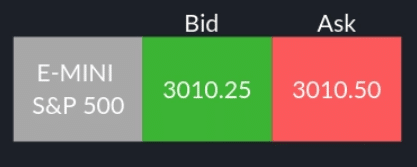
In the quote above, a trader buying the E-mini S&P 500 pays 3010.50, the ask. A trader selling gets 3010.25, the bid.
The depth of market (DOM) shows the limit orders resting at each price before they trade.
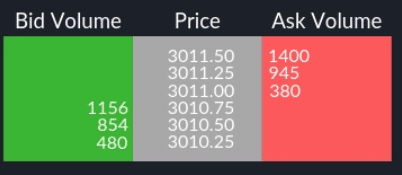
Here the market is 3010.75 by 3011.00. Sellers offer 380 contracts at 3011.00, the ask. Buyers bid for 1,156 contracts at 3010.75, the bid.
Resting orders can be pulled at any time, and many never trade. A footprint chart ignores them. It only counts orders that were actually filled. That is the key difference: the DOM shows what traders might do, and the footprint shows what they did.
How to Read a Footprint Chart
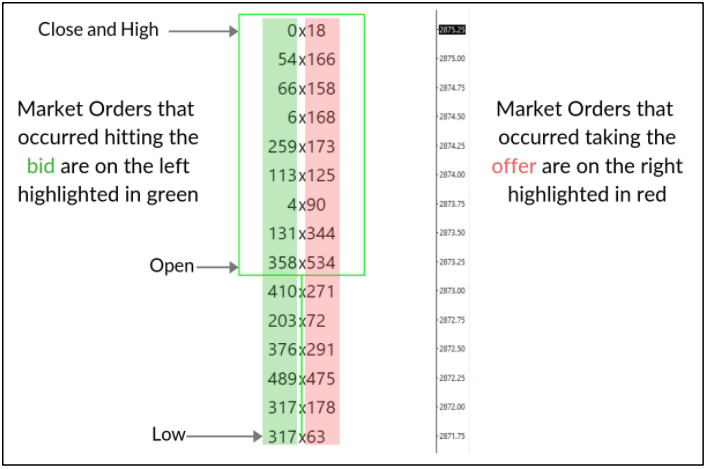
The bar above is one footprint bar. Each row is one price. The left number is volume from market orders that hit the bid, so it counts selling. The right number is volume from market orders that took the offer, so it counts buying. In this chart the bid side is green and the ask side is red. Colors are only a setting, so always check which side is which on your own chart.
Read a footprint chart on the diagonal. A quote is always one bid and one ask, one tick apart. When the market was 2874.00 by 2874.25, 113 contracts traded on the bid at 2874.00 and 173 contracts traded on the offer at 2874.25. So you compare each ask number with the bid number one row below it.
You can also add up each column. Buy volume in this bar is 3,126 contracts and sell volume is 3,103. The difference is called delta. Here delta is only +23, even though the bar closed at its high. A strong close with almost no net buying is the kind of detail a candle hides. For a deeper look at delta, see our guide to volume and delta.
Common Types of Footprint Charts
- Bid/ask footprint: shows sell volume and buy volume side by side at each price. This is the most common layout and the one shown above.
- Delta footprint: shows one number per price, the buy volume minus the sell volume. It makes it quick to see which side was more aggressive at each level.
- Volume footprint: shows the total volume at each price, with no split between buyers and sellers.
- Footprint profile: draws the volume at each price as a small sideways histogram inside the bar. It shows where volume pooled, such as the price with the most trading in the bar.
Footprint Chart Patterns Traders Watch
None of these patterns is a trade signal on its own. They are clues. Traders read them with context, such as the trend, the time of day, and nearby levels.
Imbalances and Stacked Imbalances
An imbalance is a price where one side clearly outweighs the other on the diagonal. NinjaTrader’s default ratio is 1.5. In the chart above, 173 contracts were bought at 2874.25 and 113 were sold one tick below. That is a ratio of about 1.53, so it would count as a buy imbalance.
A stacked imbalance is several imbalances in a row on the same side, in a tight price range. It shows that buyers or sellers were aggressive through more than one price. Some traders mark that zone as possible support or resistance if price comes back to it. It does not always hold.
Absorption
Absorption is the name traders give to heavy selling that fails to push price lower, or heavy buying that fails to push it higher. On a footprint chart it looks like large numbers at one price while the bar cannot move through that price. It suggests passive limit orders are taking the other side of the trade. Traders often wait for price to confirm before acting on it.
Delta Divergence
A delta divergence is when price and delta disagree. For example, price makes a new high, but the bar’s delta is negative or lower than it was at the last high. Some traders read this as buying pressure fading. Divergences can last for a long time, so most traders pair them with other evidence.
Large Trades and High Volume Prices
Traders also watch for unusually large trades at one price and for prices where a lot of volume collected. These areas often draw attention later because many traders hold positions from them.
How to Set Up a Footprint Chart in NinjaTrader 8
NinjaTrader 8 builds footprint charts with its Order Flow Volumetric bars. These are part of Order Flow+, a paid feature set. NinjaTrader’s help guide says “Order Flow + studies are included for all NinjaTrader lifetime license users.” Check NinjaTrader’s pricing page to see how Order Flow+ applies to your plan. Order Flow+ also includes tools such as Cumulative Delta, Volume Profile, Order Flow VWAP, the Trade Detector and the Market Depth Map. For a tour, read does NinjaTrader have order flow.
Once Order Flow+ is active, the steps from NinjaTrader’s help guide are:
- In the Control Center, open the New menu and choose Chart. The Data Series window opens. On a chart you already have, right click the chart and choose Data Series, or press Ctrl+F.
- Pick your instrument.
- In the Type list, choose Volumetric.
- Set the Base period type and Base period value. This is the bar each footprint is built on, such as a five minute bar.
- Set Ticks per level. A value of 1 shows every price. A higher value groups prices together, which helps on fast markets.
- Choose the Delta type. BidAsk classifies trades by bid and ask. NinjaTrader notes this needs historical bid and ask tick data from your data provider.
- Under the chart style, pick BidAsk to see both columns or Delta to see one net number per price. Turn on Show imbalance and set the Imbalance ratio and Minimum delta for imbalance. The defaults are 1.5 and 10, and the mode can be diagonal or horizontal.
- Turn on Show bar statistics if you want rows such as Delta, Delta (%), Cumulative delta and Volume under each bar.
You can find each setting in NinjaTrader’s Order Flow Volumetric Bars help page. New to the platform? Our guide on how to use Chart Trader in NinjaTrader covers placing orders from the same chart.
How Our Order Flow Tools Fit In
We build NinjaTrader 8 add-ons for traders who already read order flow. Both tools below assume you know these concepts. They do not teach order flow.
- Impact Order Flow Indicator: shows bid and ask activity, volume, delta, diagonal imbalances, block trades and unfinished auctions on your chart. Its Print Mode displays bars as Bid / Ask, Volume or Delta, so you can read inside each bar. It also plots VWAP, Point of Control and Value Area levels. It is for analysis and does not place orders.
- Order Flow Entry Orders: an Enhanced Chart Trader module that reads NinjaTrader’s Volumetric bars and places semi-automated entries on stacked imbalances, block trades or washout signals. It requires NinjaTrader’s Order Flow+ feature set.
The Impact Order Flow Entry Orders package combines both, plus Close Bar Entry Orders and Basic Chart Trader Tools. You can see all of our NinjaTrader order flow tools in one place, or read our tips on choosing an order flow indicator.
Footprint Chart FAQ
What does a footprint chart show?
It shows the volume traded at each price inside a bar, split into buying at the ask and selling at the bid. Many layouts also show delta and highlight imbalances.
Why do some footprint charts include limit orders and some do not?
A true footprint chart only counts filled trades. Resting limit orders that have not traded belong to the order book. Some platforms place depth tools next to the footprint. In NinjaTrader that is the Market Depth Map, which is a separate Order Flow+ tool.
What do green and red mean on a footprint chart?
There is no fixed rule. Each platform lets you pick the colors. In NinjaTrader you set the Color for buy imbalance and Color for sell imbalance in the chart style. Check your chart’s settings before you read the colors.
Does NinjaTrader have footprint charts?
Yes. NinjaTrader 8 calls them Order Flow Volumetric bars. They are part of the Order Flow+ feature set, which NinjaTrader includes with its lifetime license.
What is a footprint profile?
It is a footprint bar drawn as a small volume histogram at each price. In NinjaTrader this is the Show as profile option on Volumetric bars.
Is footprint trading good for beginners?
Footprint charts carry a lot of data and take practice to read. Learn the bid and ask first, then delta, then imbalances. Practice on a simulation account before you trade live, since no pattern works every time.
Affordable Indicators brings 18+ years of programming experience to its tools. Browse our NinjaTrader indicators for your NinjaTrader platform.