 Compare Trade Copier Solutions 🥇 Start Here


Sale! 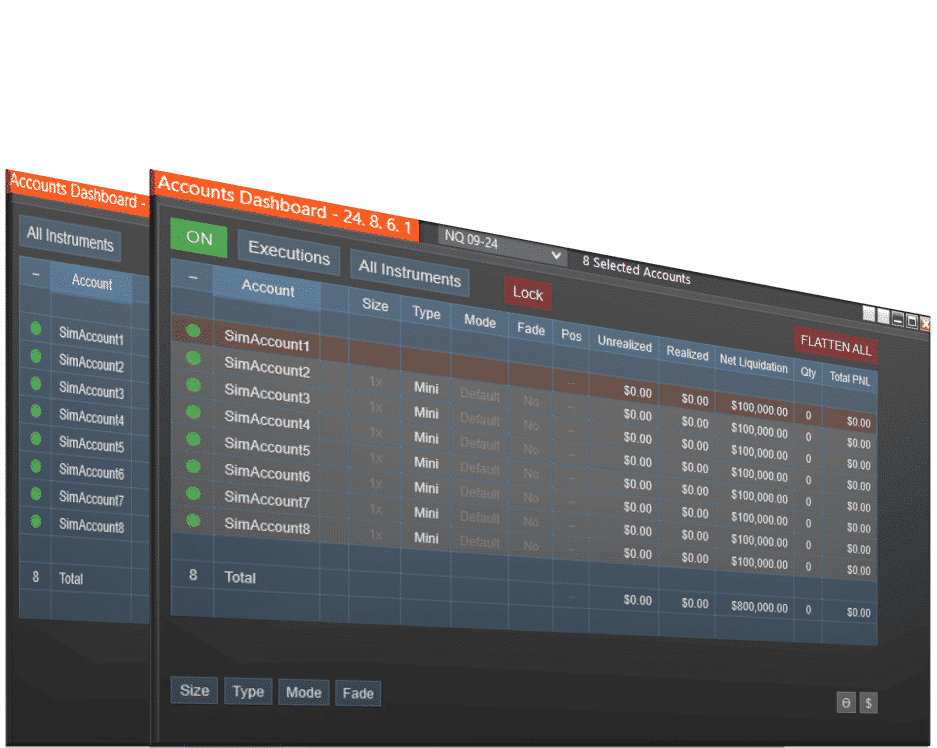
Accounts Dashboard Suite
Introducing the Ultimate Account Management Bundle for NinjaTrader! This all-in-one solution combines our premiere Duplicate Account Actions trade copier and our top-rated Account Risk Manager at a better price.
Summary
The NinjaTrader Accounts Dashboard Suite is an all-in-one multi-account management bundle for NinjaTrader Desktop. It combines Duplicate Account Actions, our premier trade copier, and Account Risk Manager, our advanced risk-control tool, inside a single, streamlined Accounts Dashboard window. With this unified NinjaTrader dashboard, you can copy trades across multiple accounts, customize contract sizing and ATM strategies, and enforce prop-firm-style daily goals and losses, all from one place.
Accounts Dashboard Suite Benefits
Save $100 when you bundle the premier Duplicate Account Actions trade copier with our top-rated Account Risk Manager. Instead of purchasing each tool separately, the Accounts Dashboard Suite gives you both in one integrated NinjaTrader dashboard at a significantly better price.
The Accounts Dashboard Suite offers the following
- Executions Mode simplifies trade copying by sending market orders to follower accounts when the Master fills.
- Orders Mode mirrors all order placements, modifications, targets, and stops for tighter price synchronization.
- All Instruments or Single Instrument Control lets you copy trades across every market or restrict copying to one instrument.
- ATM Strategy Assignment allows each follower account to run its own ATM strategy configuration.
- Unified View of Positions and Orders makes it easy to monitor everything across all accounts in one dashboard.
- Fade Mode enables selective accounts to take the opposite side of the Master trade, helpful for hedging or testing.
- Rejected Order Handling automatically resubmits rejected follower orders as market or limit orders to maintain account alignment.
- Built-In Risk Management includes daily goal, daily loss, trailing drawdown tracking, funded goal tracking, and more.
- Lifetime Upgrades and Live Chat Support ensure ongoing improvements and direct customer assistance whenever needed.
Watch this video for an overview of the latest features! You can find more videos in this playlist on the YouTube Channel.
Account Dashboard Suite Features
Duplicate Account Actions – NinjaTrader Trade Copier
Duplicate Account Actions is the trade copier included in the Accounts Dashboard Suite. It offers a complete set of tools for synchronizing trades across multiple NinjaTrader accounts, including:
- Flexible tracking for all instruments or a single selected instrument
- Real-time visibility of positions and pending orders across all accounts
- Per-account customization for contract size, contract type (Mini or Micro), copy mode, and fade settings
- Executions Mode, which sends market orders to follower accounts based on Master fills for simple and reliable syncing
- Orders Mode, which places and updates all order types to match the Master account for tighter entry and exit price alignment
- Built-in rejected order handling that automatically resubmits orders as market or limit orders to maintain synchronization
Duplicate Account Actions can be purchased on its own if you need a standalone trade copier without the additional risk management features included in the Suite.
Account Risk Manager – NinjaTrader Risk Management
Account Risk Manager is the risk control tool included in the Accounts Dashboard Suite. It adds per-account risk automation and prop firm rule support, including:
- Daily goal and daily loss limits that automatically flatten accounts and stop further trading for the day
- Automatic funded exit that flattens an evaluation account when the funded goal plus your buffer is reached
- Trailing drawdown tracking through the From Closed column with color-coded warnings
- The One Trade feature for evaluation accounts that require a daily trade after passing
- Exit Shield, which restricts modifications that increase risk or reduce reward by protecting stop and target order placement
Account Risk Manager is also available as a standalone product for traders who want advanced risk automation without a trade copier.
How to Use the Accounts Dashboard Suite
Using the Accounts Dashboard Suite is simple. Everything is managed inside one unified NinjaTrader dashboard where you control trade copying and risk management for all connected accounts.
1. Select Your Master and Followers
Choose one Master account and select the accounts you want to follow. The dashboard shows which accounts are active and ready for syncing.
2. Choose Your Copy Mode
Use the mode that fits your workflow:
- Executions Mode sends market entries and exits to follower accounts.
- Orders Mode mirrors entry orders, targets, stops, and adjustments.
Mode settings can also be customized per account.
3. Configure Each Follower Account
Adjust how each follower behaves by setting:
- Position size
- Mini or Micro contract type
- ATM strategy
- Fade (opposite direction) if needed
4. Set Risk Controls
Apply per-account protections such as:
- Daily profit goals
- Daily loss limits
- Trailing drawdown and funded goal tracking
- Exit Shield to prevent unsafe stop or target changes
Accounts that hit their limits are automatically flattened and excluded from further trades for the day.
5. Trade on Your Chart
Place trades on NinjaTrader or on platforms connected through NinjaTrader Desktop. The Suite syncs executions, manages orders, and enforces your risk rules across all selected accounts.
Related NinjaTrader Products
Professional Chart Trader Tools
The Professional Chart Trader Tools bundle includes all Enhanced Chart Trader modules in one package, giving traders faster entries, smarter ATM strategy control, and a more flexible execution workflow.
- Advanced entry tools for price action, signals, and order flow
- Enhanced ATM strategy features and customizable order placement
- Modules for scaling in, scaling out, and managing complex trade scenarios
The Professional Chart Trader Tools bundle is an ideal upgrade for traders who want a complete execution toolkit alongside the Accounts Dashboard Suite.
Support and Resistance Suite
The Support and Resistance bundle includes all support and resistance indicators, plus two signal tools at no additional cost, designed to help identify high probability reaction zones and cleaner entry opportunities.
- Key Levels Confluence
- Price Action Confluence
- First Touch Signals
- Ichimoku Cloud Signals
A strong companion for traders looking to improve setup quality before copying trades across multiple accounts.
Download the NinjaTrader Accounts Dashboard Suite
The NinjaTrader Accounts Dashboard Suite gives you a professional-grade NinjaTrader dashboard for multi-account trading: precise trade copying, per-account customization, and prop-firm-ready risk controls, all in one window.
Download the Accounts Dashboard Suite today to simplify your multi-account management, enforce your rules automatically, and trade with more confidence across every NinjaTrader account.
Looking for more tools? Explore our full NinjaTrader software library.
FAQs: NinjaTrader Accounts Dashboard Suite
Is the Accounts Dashboard Suite just two separate tools, or a single integrated window?
It’s both: Duplicate Account Actions and Account Risk Manager can be purchased separately. Still, when you buy the Suite, they run together inside a unified Ninjatrader dashboard window with shared controls and layout.
What happens when an account hits its daily goal or daily loss?
When an account hits its configured daily goal or loss, Account Risk Manager auto-flattens that account and highlights the cell. That account is then automatically excluded from future follower trades for the rest of the day, even if it’s still selected as a follower.
Can I run different modes and ATM strategies per follower account?
Yes. Using the Mode adjustment column, you can put some accounts in Executions mode, others in Orders mode, and assign unique ATM strategies per account, each with different stop/target configurations.
Does the Suite support trades placed on TradingView or Tradovate?
Yes. As long as the accounts are connected to NinjaTrader Desktop, trades placed on supported platforms (like TradingView or Tradovate) can be copied through Duplicate Account Actions into all configured follower accounts.
How does the privacy feature help if I stream or record?
You can hide account numbers and all currency values across the entire window with one click, allowing you to show your workflow, entries, and settings without exposing balances or account IDs.
Reviews
Customer satisfaction is our highest priority! We use Trustpilot and Google Reviews for the best transparency.
NinjaTrader Platform
New to NinjaTrader? Check out our NinjaTrader page to get started! It is free to download immediately.
Have other questions about NinjaTrader? Check out our FAQ page!
Refund and Sales Policy
All sales are final and non-refundable. If you have any questions please contact us before completing a purchase.
Product licenses can only be used on the purchaser’s computer/computers. Extra product licenses cannot be given away for free or resold. All purchases include a lifetime license with future upgrades for free. Our goal is to continually improve all of our products in performance, compatibility, and new features!
Discord
We’ve created a community platform where users can interact with and help each other succeed in their day trading goals. Join our Discord Channel Today!
Categories: Bundles, Indicators, Trade Copier

Buy With Confidence
We have a strong foundation with over 12 years of experience serving thousands of NinjaTrader users.

Contact Our Team
We would love to hear from you! The best way to reach us immediately is using the circular help button in the bottom right corner of this page.
Check out other related NinjaTrader indicators and tools...
- Sale!
 Bundles
Support and Resistance Suite
$1,495.00$895.00 40% OFF This product has multiple variants. The options may be chosen on the product page - Sale!
 Bundles
Professional Chart Trader Tools
$3,995.00$2,795.00 30% OFF This product has multiple variants. The options may be chosen on the product page - Sale!
 Enhanced Chart Trader
Essential Chart Trader Tools
$995.00$495.00 50% OFF This product has multiple variants. The options may be chosen on the product page