
Account Risk Manager
The most reliable and advanced account risk manager for NinjaTrader Desktop, built for prop firm, funded, and personal accounts.
Overview
$1951 PC
$2951 PC$390 bought separately
Over 9 in 10 traders in the last 90 days chose the Accounts Dashboard Suite over Account Risk Manager alone.
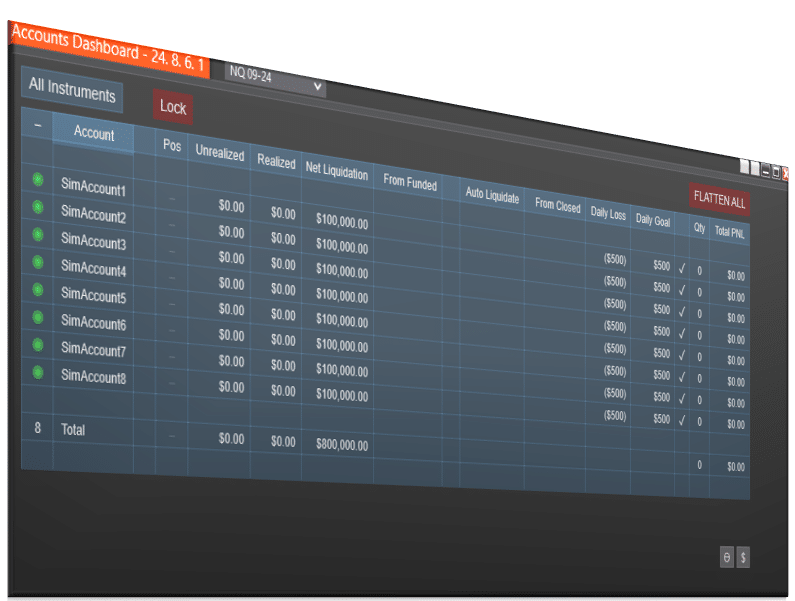
View Accounts Dashboard Suite →Account Risk Manager is a reliable risk control tool for NinjaTrader Desktop. Built for prop firm, funded, and personal accounts, it enforces daily goals and losses, tracks trailing drawdown and auto-liquidate levels, adds exit-order protections, and even includes a one-click “One Trade” helper for firms that require a daily trade.
NinjaTrader has never limited Tradovate connections, so the risk manager covers every Tradovate-based prop firm you connect, with no add-on. Alongside them, NinjaTrader Desktop runs one Rithmic connection (one login) at a time, with every account on it. For accounts at two or more Rithmic prop firms, Unlimited Prop Firm Connections lets you connect and manage them together.
Built For Every Trader
Prop firm compliance — Hit evaluation goals safely, auto-flatten at funded thresholds, and always see your distance to trailing drawdown in real time.
Funded accounts — Enforce daily loss and profit targets. Use the One Trade button to satisfy daily activity rules with minimal exposure.
Personal & cash accounts — Apply the same discipline that keeps prop accounts safe: daily caps, exit protections, and clear risk visibility.
Multi-account workflows — Configure different daily caps and protections by account and toggle them on/off as you rotate through accounts.
Note: As a third-party provider, we’re limited in our ability to fully restrict trading once a daily goal or loss limit is reached, since indicators can be manually removed.
📦 What's Included
What Customers Are Saying
“I've been using the Accounts Dashboard suite with trade copier and risk manager and it is absolutely phenomenal. The download and setup was quick and easy with the manual and video links provided. I currently have 8 accounts that I am copying across and it has worked perfect. I highly recommend it!”
“I purchased the Basic Chart Trader and the Copy Trader/Risk Management combo. The items work well but remember, Copy trading there is slippage. The adjustability is great compared to other companies. I used these for last couple of months. I give the products I use an overall RATING of 4.8 Thank you Joel and Team for quality products.”
“As a professional NQ futures day trader and quant trader running nearly 100 automated bots across multiple prop firm accounts, I put the Affordable Indicators suite through serious real-world stress testing.”
Refund and Sales Policy
30-day money-back guarantee. If this product does not work as advertised, report it within 30 days of your purchase and give us 14 days to resolve the issue. If we cannot, you get a full refund. The guarantee covers the purchase price only, never trading results or losses on any account. Read the full terms.
Product licenses can only be used on the purchaser's computer(s). All purchases include a lifetime license with free future updates.
Account Risk Manager Features & Benefits
Prop Firm Tracking
Track auto-liquidation thresholds, amount from funded, and other key prop firm parameters across all your accounts.
Daily Loss & Goal
Set custom daily profit goals and loss limits per follower. Positions auto-liquidate and trading stops once either threshold is hit.
Funded Goal
Set a funded account target per follower. Once the cumulative profit goal is reached, the account auto-closes and stops trading.
Exit Shield
Restrict stop loss and profit target adjustments to prevent increased risk or reduced reward on Follower accounts.
One Trade Button
For funded or passed eval accounts with no trades today, click once to submit a micro in/out and satisfy daily trade rules.
Included with your purchase
Lifetime Purchase
A one-time purchase with a lifetime license — no monthly or yearly fees. Buy once and it stays yours across every future version.
Free Updates
Free lifetime upgrades — every new feature and improvement is included at no extra cost, updated regularly from trader feedback.
Customer Support
Human live-chat support included with every license — real people who usually reply within minutes, before and after you buy.
Video Overview
Watch this overview, or browse more on our YouTube channel.
Reviews
Every review here is a genuine customer review from Trustpilot, Google and our YouTube community — never fabricated.
Leave a review →Magnificent products that make a trader's life easier. I recommend them.
Trade copier from Affordable Indicators just works great! It has resolved all the issues and glitches found with other similar copiers, i.e. late fills, reverse position entries, slow updating PnL etc. The risk management features works instantly to stop trades beyond set profit for the day when managing multiple firms with different consistency restrictions. Thanks to their connection tool, login multiple Rithmic prop works now which is very handy keeping everything in one place and trade with large number of accounts!
The chart trader works excellently without causing any additional drag on PC resources, PnL updates instantly on all brackets on every chart open and break even, click buy/sell works without fail. And above all these fantastic features, customer service is top notch! Joel (Owner himself) would chat with you and resolve any technical difficulties with the products, even if it's Saturday afternoon! The team at AI listens to the feedback and make quick updates to their products, which is greatly appreciated.
First of all, I have used many trade copiers before I found Affordable Indicators. This is the best I have used and have had no copying issues at all. And the Risk Manager works great trading prop firms.
Second, support has been first class. The product has improved through the updates I have been a part of. And any questions are responded to quickly.
Highly recommend!
I initially purchased just the Trade Copier from Affordable Indicators and was very impressed with how well it performed. After using it for a while, I decided to add the Risk Manager. Their pricing at the time was a bit higher than I wanted to pay, but the bundled package (Copier + Risk Manager) was only a few dollars more than the standalone price I was looking at. I reached out to them, and they kindly honored a discount code for me.
Their support has been top-notch from day one — every question I’ve had was answered the same day. I also really appreciate how they’re constantly working to improve the product and add value.
After just one week of using the Risk Manager, I can confidently say it’s a game changer in the prop firm world for copy trading. The amount of features and control it gives you makes it an absolute necessity if you’re serious about copying trades safely and effectively. It’s well worth the price and has quickly become one of my must-have tools.
Highly recommended — excellent product and even better team behind it. Thank you!
As a professional NQ futures day trader and quant trader running nearly 100 automated bots across multiple prop firm accounts, I put the Affordable Indicators suite through serious real-world stress testing. My approach combines scalping with systematic algo strategies – so reliability and execution precision are non-negotiable.
The toolset – Account Dashboard, Trade Copier, Risk Manager, Daily Stop Loss – is built for traders who operate at scale. For prop firm traders managing multiple accounts with centralized risk control inside NinjaTrader 8, there's nothing comparable at this price point.
What really stands out is the support team. When I ran into complex configuration issues across multiple broker connections (Rithmic & Tradovate) with concurrent copier instances on live funded accounts, the team understood the context immediately and guided me toward the right solution – without generic responses. Once properly configured using the correct copy mode for my setup, execution accuracy improved significantly.
Professional-grade tools backed by professional-grade support. Highly recommended for serious traders who demand more than retail-level software.
I purchased Affordable Indicators Risk Management, and Trade Copier tools about a month ago. I am not a person who is easily impressed, but when say every serious trader should own these products, I mean it. I love these tools. I now trust that my master account and followers will execute trades beautifully. In addition to loving their products, their customer service is top tier. Today they went above and beyond to help me with a situation that wasn't their responsibility to solve. Amazing company!
There are multiple trade copiers out there and they are all basically the same, except for Affordable Indicators. This is the only reason why I bought their trade copier. I run multiple trading bots but I wanted them all synced to one follower account. I wanted the follower account to use the combined total PnL from multiple master accounts. Once either my max goal or loss was reached the follower account will no longer accept trades. There is no other trade copier out there that would allow this setup. With the help of David I was able to get it exactly how I wanted. And this alone make their trade copier the only one anyone will ever need.
I've been using the Accounts Dashboard suite with trade copier and risk manager and it is absolutely phenomenal. The download and setup was quick and easy with the manual and video links provided. I currently have 8 accounts that I am copying across and it has worked perfect. I highly recommend it!
i have both trade copier suite and enhanced chart trader.. excellent software add on to ninjatrader 8
customer service and support is amazing.
The Accounts Dashboard product works very well for managing multiple accounts for both entries/exits (trade copier) and for setting limits/goals for different accounts (risk manager).
I haven't had any issues with the product, and their customer service team responds quickly and concisely.
It's also nice to get replies from Joel himself for both questions and support issues. It shows he cares about his product and he continues to polish and improve it year after year!
The Chart Trader is great! I purchased the Trade copier and had a minor issue with the install.(May have been user error) emailed the team and got a quick response with an immediate phone call that fixed the installation. (Did I say in a matter of hours??)
The customer service and products are second to none!!
I purchased the Trade Copier / Risk Manager module two weeks ago. I was so impressed with that product, this past week I purchased the Price Based Entry Orders module. I can honestly say I have no regrets on both.
The Trade Copier / Risk Manager simplified my trading, taking most of the guesswork out of managing risk across several accounts. The Price Based Entry Orders has absolutely enhanced the way I approach the market and I cannot imagine trading without it now.
Team members reached out to me personally several days after purchase for each product to ensure the products were working as expected, which speaks to the level of customer service.
The two products I purchased do exactly what they guarantee, installation was extremely simple and the value in my opinion is exceptional. I will definitely consider purchasing additional modules.
I’ve been running the Accounts Dashboard Suite from Affordable Indicators for a few months now and it’s honestly one of the smartest purchases I’ve made for my NinjaTrader setup.
The lifetime license is huge, no monthly or yearly fees, free upgrades forever, and live chat support whenever you need it. You buy it once and it’s yours. But the absolute best part is the built-in risk management that’s literally made for prop accounts. You set your daily goal, daily loss limit, and funded goal, and the suite automatically flattens positions and stops trading when you hit them.No need to set loss/limits in your brokerage settings! If you trade futures on NinjaTrader and need rock-solid risk controls for prop firms, stop thinking about it and grab the Accounts Dashboard Suite. Worth every penny and then some. Highly recommended!
Simply elegant Suite. Not a bunch of random products. The anccount duplicator and risk management features appear in the basic and essential chart trader so the UI across products is uniform passively contributing to execution accuracy beyond the features themselves. Big fan.
I've only had the trade copier for a couple of weeks, but so far I love it. It has a feature that handles the ghost orders that often occur in Ninja Trader. I also like the risk management tool. It was also very easy to purchase and get set up. The videos made it very easy to get going.
This is my 4th indicator from Joel and his Team. Exellent value for money, and the features, execution and functions of the copier and risk management is unmacthed. Joel's ability to translate requirements into features is genius. Keep it up and thank you!!
This trade copier is such a great investment when it comes to trading. You can copy trades, choose daily profit and losses, choose number of contracts separately for each account and so much more. This has been a game changer for me and makes it so easy to keep track of all my accounts.
I don't know who Joel is but JOEL is GREAT!!! I couldn't have asked for a better person to deal with. I decided to switch from Replikanto for ALOT of reason. Main, coding, it can and will mess with templates. I found out the hard way. But the main reason why I decided to switch to AF is because of their Daily Loss/Goal feature. If you copy trade with different prop firms and account types this feature alone is 100% worth it! Do yourself a favor and stop looking and just purchase it. Just make sure to purchase the bundle, unlike me. And yes Joel and AF took care of me. 10/10 Highly recommend.
As a new trader, after research this seemed like a logical investment. I've only executed on TradingView as Ninja seemed a little bit much for a beginner. I was able to download NinjaTrader and install the Suite (Copier & ARM) and get the program working without a hitch. IT IS KEY YOU FOLLOW INSTRUCTIONS THE FIRST TIME. First week is green on 5 accounts.
It also seems like the guy it 1000% invested in this too as the passion is clearly visible.
Thank you Affordable Indicators for a great product.
First, I want to say that the copy trade indicator — and now the risk manager I'm about to use — are the best I’ve seen compared to what’s available in the market. They’re reliable and never crash. It’s truly a game changer if you want to be profitable in the trading world. But the other important thing is the support I received — it was outstanding, super understanding, and incredibly warm. I recommend them 1000 percent.
Abolutely terrific! David was helpful and considerate. I was not expecting a fix just for me, but I got it in a short time. As a long-time programmer, I've had to deal with technical support staffs many times. None was better than what I experienced today.
Excellent products. I have the copier and risk manager. Both work perfectly. I have not experienced the slippage with the copier, unlike with other copiers. I passed an eval, and the risk manager stopped trading that account immediately. I didn't get a chance to blow the past account.
I purchased the Basic Chart Trader and the Copy Trader/Risk Management combo. The items work well but remember, Copy trading there is slippage. The adjustability is great compared to other companies. I used these for last couple of months.
I give the products I use an overall RATING of 4.8
Thank you Joel and Team for quality products.
I’m very happy I found this trade copier. No issues at all and works like a charm. The added risk management feature is amazing too. I have used other copiers in that past and have been extremely let down. Not the case here very reliable and Joel and his team have great customer service too. They respond very promptly to chats and emails. Thanks guys!!!!
I purchased the Duplicate Account Actions & Account Risk Manager bundle and couldn't be more pleased! I had purchased another copy trading software previously but this one is so much better. I trade futures (mostly MNQ) and combined with the risk manager, I have everything I need to help me successful with my prop firm accounts. Previously I was trying to keep track of trailing drawdowns with unrealized profit in a spreadsheet, and it was a nightmare because I do a lot of scalping. Joel's software suite solves that problem and so many others. Here's what I love:
- I can see all of my accounts in one place, regardless of how many EA/PAs I have and which firm they're from
- I know how close I am to funded (or blown) because the software knows the rules for each account type and tracks those figures
- I can stay within the consistency rules, EOD drawdowns/intraday drawdowns, max loss limits - again because the software knows the rules for each account type
- I can add my own daily loss limits and exclude accounts I don't want to trade
- I can copy trade any combination of accounts, again without having to keep track of various firms' rules
- I can trade minis or micros simultaneously in multiple accounts
- There's minimal slippage with follower accounts
A note for Mac users - I searched high and low for a copier that could work with a web-based trading platform without any luck (except through Tradovate without bracket orders, which I wasn't going to do) and Joel's software solved that problem for me with a bit of a workaround. I have a mini PC that I run NT8 and the software on, but I execute trades in TradingView on my Mac.
I just ensure that I have the same account selected in TV that is my lead account in the copier and it works great. As long as the account in TV is a Tradovate account, I can trade anything else under it, even if it's not Tradovate, which is amazing. I use a "throwaway" Apex account as my leader and copy everything else in groups that I rotate.
One other thing I've absolutely loved is the support from Affordable Indicators. I actually purchased another copier that I couldn't even figure out how to install, but even with my minimal PC experience, Joel's videos perfectly explained the installation and I was able to do it with no problem. A couple of times I've had questions and I've been so impressed that I get responses even on nights and weekends.
And if a human isn't immediately available, their AI chat bot is seriously amazing too. I've asked it things I figured I'd have to wait for a human response for, and it has given me just the answers I need. Seriously this whole company is wonderful, and I as I ease myself into actually trading on my PC in NT8, I look forward to adding more of Joel's programs. I'm nothing but impressed.
My experience with Joel’s copier has been outstanding. I normally don’t recommend trading tools to others, but I made an exception for Joel’s copier and both of my friends here in Miami who purchased it are just as impressed. I had previously purchased a few other copiers and ran into issues, but this one has worked flawlessly. As a long-time customer of Affordable Indicators, I was thrilled when Joel released his own copier, and the built-in risk management module takes it to a whole new level. It’s truly a game changer. Thank you, Joel!
I bought the trade copier a couple months ago and it has been a game changer for me. The risk management add on has literally prevented me from blowing so many accounts. Highly recommend!
I love the Trade Copier and Risk Management Dashboard! Those products work together perfectly and are a game changer in the way I manage my trading accounts. The products were easy to install, and they don't slow down my platform software like I've experienced with other add-ons. I have another copier that I don't even use anymore because this one does the job. Also, great customer service! I'll definitely be buying more products.
The Copy Trader/Account Manager is one of my favorite indicators/tools! I use it to copy trade all my accounts from multiple firms and love the feature of managing the profit and loss goals for each account...especially since each company has different consistency rules so I need different profit targets for each account. I wouldn't trade the same way without this tool. I also have the Enhanced Chart Trader with some add-ons like the Advanced Exit Orders Manager.
This tool lets me quickly and easily change my trailing stop from designated trails, like the 34 EMA, Super Trend, ATR, Fixed Ticks, or whatever I want to trail on a chart. I could go on and on about all the awesome indicators. I also wanted to mention that Joel and his team have amazing support and care about helping their clients... they also take feedback and implement suggested features in future updates. You can't go wrong with these indicators, they are some of the best out there!
Excellent trade copier and risk manager.
Favorite features:
-uses market orders to reduce desync issues
-exit shield allows me to lock my stops so that i can't pull them wider and get "stuck" in a trade
-risk manager stops me out for the day at a max loss amount
I recently purchased Affordable Indicators Risk Manager and Trade Copier. I have used a few other well known products offered by other companies with unpredictable results. The Affordable solution is by far the most user friendly and flexible, but most importantly the most precise and reliable. I am a member of a few Discord groups where most users have found their experience to be the same. I thank those members for the referal to the Affordable Indicators solution. It just works as it should!
I've been using the Enhanced Chart Trader, Trade Copier, and Account Manager products, and I must say, they're absolutely fantastic—second to none! My favourite features are the ATM Protection and the position sizing calculator, which take the guesswork out of scalping. I also love the ATM Copy feature, which allows each prop account to have its own unique ATM.
Since I started trading 1.5 years ago, these products have leveled up my trading and helped me manage my downside effectively. And a special shoutout to Joel—he's fantastic at responding and making changes on request. He's really engaged with the community, making the whole experience even better.
I recently purchased the Trade Copier and Risk Management components, and after testing it with simulated accounts, I finally made the jump to my PA and LIVE accounts. Personally, I cannot stress enough the importance of risk management when trading my accounts. As the amounts of these accounts differ, it is very important to have the flexibility to control, individually, daily loss and daily profit. These products help relieve the stress of continuously watching the limits manually and being confident that if one account reaches one of these parameters, it will close the open trades accordingly. Trading is not about making money but about preserving capital.
I've been trading a bit over 10 years now, and besides the 2 years of forex, I quickly saw the advantages of trading futures. My favorites are YM, SI, GC, NQ, and CL. I also use order flow along my charts for reversals, trend strength, imbalances, etc. Honestly, I wish this software was available a few years ago, but the time is now to take advantage of the powerful features.
Today, I reached out to customer service and had David work with me until we resolved my question. These products are highly recommended to traders, especially after hearing another platform having issues with controlling daily loss and profit. Look no further; this is the software you need. Thank you. Trader Joe 63
I have had this trade copier for a couple of month, as well as the risk management feature. I honestly have to say that this product is awesome. And the support, if needed, that you get from Joel and his partner is second to none…
I purchase the Account Dashboard Suite last week.
Wow, using this trade copier (Duplicate Account Actions) and the Account Risk Manager was MY missing link. I have owned and used NT8 for the last 18 years, back when it was the 6.5 version then 7.0. I never thought I would ever need or even want to use a trade copier. This has totally transformed my trading! This piece of software is truly priceless.
Totally customizable for each separate account that follows a master account including size, ATM, micro/mini etc. The customer service is seconded to none. Joel even called me on the phone to see if I had any questions. It's nice to have that personal relationship with such a wonderful company and owner that really care about their customers Thank you Joel!
I absolutely love Ai. I use the Copy Trader and Risk Manager (the Dashboard). I trade about 15-20 prop firm accounts at a time, and I’ve tested this out with four different prop firms at once. I’ve also tested this with up to forty accounts at once (with a TP/SL and in orders mode). It has worked great! First, the dashboard allows me to see and manage during the trading period — I can easily see which accounts I am copy trading, how many contracts per account (which can vary), which accounts I’m trading micros or minis, and which accounts are in the green (or red).
Second, I can trade across all the prop firm accounts that I want in one place. This is amazing as I don’t have to switch over to other platforms at all — everything stays organized. I have multiple Tradovate/CQG based accounts, and I have accounts with a rithmic data feed as well.
Third, while I like to keep things simple, I can still manage settings in just a few minutes if I want to change anything (take off an account, change the amount of contracts I’m trading, etc). This flexibility is key. Finally, I appreciate the risk management settings — it is great to have daily profit/ loss for every account (customizable for different account sizes, too). 10 out 10 would recommend.
I use the Professional Chart Trader Tools, Duplicate Account Actions, and Account Risk Manager items. I wouldn't think of trading without these. I love the simplicity, functionality, and it helps my trading!!!
Joel and his team deliver excellent products that have significantly improved my trading experience in NinjaTrader, and the consistency in my trading overall. Joel even custom coded a feature into the Enhanced Chart Trader that I was curious about, in a couple of days, which is wild and I'm very grateful for.
I purchased the Trade Copier + Account Manager + Risk Manager, which perform smoothly when copy trading multiple accounts with various ATM strategies and detailed risk parameters. It's given me better execution on follower accounts, easy account management, and detailed safety features to combat my own mistakes.
I also use the Close Bar Entry add-on, which has allowed me to execute certain strategies consistently that were previously impossible to execute manually when using funded prop accounts.
Definitely recommend using their products and reaching out with any questions. David, Joel and their team are kind, thoughtful, and deliver a lot of value.
I have to be honest, I was THOROUGHLY impressed by everything.
5 star product
5 star customer service
I was about to purchase another trade copier (the one everyone seems to promote) but after watching multiple YouTube reviews, I still didn't feel comfortable with it. I KNEW there must be something better out there.
I am glad I did another search and found the trade copier and account risk manager.
I LOVE the simple layout, I can see all my accounts, I can see all my multipliers. They even have an automatic order close once eval accounts hit the funded balance.
Customer service is impeccable. They replied swiftly and answered all my dumb, beginner questions.
Highly recommended. Will review on my YT channel as well (@rishithetradingyogi)
I have been using the Professional Chart Trader tools, including the Duplicate Account Actions, Risk Manager, and Impact Order Flow Indicator, and I must say they are the best on the market. The moment you start using Joel's tools, you can appreciate the time and effort spent creating these high-quality indicators and execution tools. I've tried other indicators from different brands, but AI's offerings stand out as the best by far.
Having them on my charts makes me feel like a professional trader. The tools are incredibly smooth, visually appealing, and functionally amazing. Using the Order Flow Indicator, I have developed a strategy that I am very grateful for. The support provided is also incredible.
Thank you, AI, for delivering such powerful, high-quality products to the market.
I wouldn't be able to trade without this company's products. Before I found out about Prop Firms, I tried trading in a live account and lost what seemed like a lot of money. The product that started me improving was their Enhanced Chart Trader. I am trying to micro-scalp and make $20 a trade. Now, I can instantly see when it works and when it doesn't. Their Duplicate Account Actions are the best trade copier out there.
It's the only one I know of that lets you apply different ATMs to different accounts. The Account Risk Manager works so well with Duplicate Account Actions that I recommend getting them at the same time. It shows the Trailing Threshold in real time! No more guessing how close you are to passing or failing. The company has top-notch customer support and service. I have interacted with Joel, the main guy, so many times to ask how to do things.
I purchased the trade duplicator and the risk management tool. The duplicator is way better than the cheap one offered by my prop firm. You can set it up to copy all Instruments instead of having to remember to change it before entering trades on different ones. The risk manager is also very helpful when using prop firms and when you are not disciplined enough to stop trading on your own. I love both products and will definitely recommend to my fellow traders.
I bought Duplicate Account Actions and after installation and testing decide add Account Risk Manager. Having some questions , I contact customer support and recived answer immediately. Program working excellent.
Thanks
I have several of Joels Indicators- He is a good trader himself, so this helps him understand the needs of the futures day trader/ specific to those who trade prop trader accounts along with thier cash accounts- I trade several PA accounts along with evaluation accounts and a cash account- Micros and Minis depending on the size of the account- The accounts risk manager/ trade copier is a invaluable tool for anyone who wants to manage multiple accounts with different contract sizes, types and daily goals and daily loss parameters for EACH account. Pretty cool.
Also for evaluation accounts, two tools that he programmed into the indicator that is pretty clever and useful is , the ability to click “one trade “ across multiple accounts that basically enters a single Micro contract and exits immediately to satisfy a daily trade requirement for an Evaluation that has passed.. The other is, the indicator has been coded with each respective profit goal for the size of the evaluation account you might be trading, and with a sinple click, the account will automatically flatten upon qualification.
The peak threshold amounts and the “from closed” column are very important to know where you stand at all times- especially beneficial in a PA account. These amounts can be synced to the penny with rthmic in the settings.
There are lots of other flexibility in the settings-
I would recommend watching the videos and be mindful of what contracts you want the indicator to default to. All in all, worth every penny.
This trade copier is way more advanced then the one I was using (very excited). The Risk Manager is the other real key to success for me, to keep my risk in control. I like how Joel is always taking feedback and making updates to the products to make them even better for the trader community.
Thanks Joel, awesome product!
Excellent trade copier and risk management tool. This has features already that nobody else has and the developer has shared future plans which are even better! Extremely helpful to stay organized managing multiple accounts. The support is also great with helpful videos and quick responses to questions. I will likely try some of their other products in the future.
I'm very happy with the Accounts Dashboard. A special feature is the ONE TRADE Action, which automatically will get you into a trade and out when you have just passed an Eval Account and need to get several days of trading to pass. For APEX it's 7, so just keep pressing this up to 7 times and you've qualified. I recommend using MYM, Micro Dow, one tick is only 50 cents. I also purchased the Risk Management addon and am equally happy with it.
Before I it was very difficult to know what my trailing threshold was. I use Tradovate on APEX and I had to go back to Tradovate to see what it was. It has Daily Loss and Daily Goal limits that stop you out from exceeding them. That will save people from blowing out accounts from overtrading! Other than that it has the standard trade copier features, when I was shopping for one and I saw those features I bought Affordables immediately.
The most reliable and informative trade copier I have used. I also purchased the Risk Manager to go along with it since I use Apex for a prop firm and trade 7 accounts. I purchased the 2 PC (license) version so both my wife and I could use it. It is so convenient to quickly see at a glance my account balances along with how far I am from my account goals (good and bad). I chose this Duplicate Account Actions or trade copier over the more popular one because there are so many more features.
I can trade each account individually, choosing to trade a mini, micro, or different quantities for each account. For really bad trading days you even have the option to have "opposite day", trading a copy account in the opposite direction of the leader account. Of course, if you have any confidence in your abilities that is hard to do, and I have never used that feature. I have never had a trade get stuck or not activate as intended and if I do, I'm confident it will be a Ninja or rTrader issue, not the indicator.
I highly recommend these 2 indicators. Although I am confident that there is a great deal of time invested in writing this software, at least in my financial situation, I don’t think I would consider $295 for each affordable. I will say I aspire to purchase the Essential Chart Trader Tools next, but at $1395 for my wife and I, it may be a while.
Bottom line, I love what he has done here. My feature wish list would be to add a hover feature to remind you what the different features are. Also, although the indicator reminds you which accounts you still need to trade for the day, it would also be nice if it could keep track of trading days so you know how close you are to your 7-day goal at a glance.
If you subscribe to a prop firm and trade multiple accounts, you need this software!
I have purchased several indicators including the trade copier, risk manager and basic chart trader. These tools have really simplified my trading experience and helped me focus on identifying high probability setups and trusting the trade manager for executions. Having tried other trade copiers where the fills were not guaranteed, and which led to several bad experiences, I decided to try this one and I am so happy that I did.
I am still trying out the Risk Manager and so far I find it a useful tool along with the copier. Overall, the products are high quality and I use them daily. I get quick responses to my queries. Joel also frequently updates the indicators and notifies us of all the new features etc. Highly recommended!
As a long-time NinjaTrader user, I needed tools to help minimize risk and maximize profits in my trading. Affordable Indicators has not only met those goals but far exceeded them. The support is incredible. I have great conversations with the developer on ideas and where products are headed. Chart Trader is central to my daily workflow, and now as I add Eval accounts, Duplicate Accounts and Account Risk Manager are now central to my day-to-day.
I have confidence that I can just focus on trading and Account Risk Manager will ensure I don't violate the rules during eval. ChartTrader is incredible as I know whatever the situation is, I have the tools to execute. From needing the flexibility between close bar entries, resting orders and various stop methods like trailing high/low of bars and fixed trailing mode, I can switch between the method I need during that time to minimize my risk and maximize my entry positioning. I don't need any other tools and I'm really thankful these tools exist. Thank You!
I have been a Ninja Platform trader for many years, trading NQ , and I like to purchase software products with confidence .
Affordable Indicators can be trusted for exelent quality and exelent service .
Affordable Indicators products are innovative and of a very high quality standard .
I purchase their products with great confidence, and have had great trading success using the software.
My preferred indicator is the'Duplicate Account Actions' with the 'Account Risk Manager'
No reviews at this rating yet.
Customer satisfaction is our highest priority. We use Trustpilot and Google Reviews for full transparency.
Screenshots

Requirements & Setup
System Requirements
| Platform | NinjaTrader Desktop (NinjaTrader 8) |
| NinjaTrader versions | NinjaTrader 8.1.x.x (every 8.1 release, including the latest, 8.1.8.3) and NinjaTrader 8.0.28.0. On 8.0.28.0? After you buy, request the 8.0.28.0 build in your Members Area or ask us on live chat. |
| License | Lifetime — 1 PC or 2 PC options available |
| Accounts | All accounts must be connected to NinjaTrader Desktop simultaneously |
| Account Limit | No limit — manage risk across as many accounts as you need |
| Account Types | Prop firm, funded, brokerage, and simulation accounts |
| Connections | Rithmic, Tradovate, and other connections commonly used by prop firms |
| Trade Copier | Sold separately — not required to use Account Risk Manager |
| Support | Live chat support included with every license |
| Updates | Free lifetime upgrades — features updated regularly based on trader feedback |
Installation
After purchase, download the file and import it into NinjaTrader Desktop using the import function. Open the Accounts Dashboard, enable Risk, initialize peak/funded values, and set daily goal/loss per account. Make sure all accounts are visible in the Control Center before setup.
After Purchase
Your download will be available instantly in your Members Area. A detailed user manual walks you through every step of the installation, and a video guide is included so you can follow along visually. Need extra help? Use our live chat or join the Discord community.
Good to Know
Which NinjaTrader version does this work with?
It is built for NinjaTrader Desktop (NinjaTrader 8) on Windows: every 8.1.x.x release, including the latest, 8.1.8.3, and NinjaTrader 8.0.28.0. On 8.0.28.0, request the 8.0.28.0 build in your Members Area or ask us on live chat after you buy. Like every NinjaTrader add-on, it does not run on NinjaTrader Web or the NinjaTrader mobile app.
Is this a one-time purchase or a subscription?
A one-time purchase. Every license includes a lifetime license with free future updates — no recurring fees.
Can I use it on more than one computer?
Yes — choose the 2 PC license option at checkout to run it on a second computer.
Do I get free updates?
Yes — free lifetime updates. New versions appear automatically in your Members Area.
What support is included?
Human chat support plus our active Discord community, backed by 18 years of NinjaTrader programming experience.
What is your refund policy?
This product is covered by our 30-day money-back guarantee. If it does not work as advertised, report it within 30 days of your purchase and give us 14 days to resolve the issue. If we cannot, you get a full refund. It covers the purchase price only, never trading results or losses on any account. See the full terms.
Frequently Asked Questions
Does NinjaTrader have risk management tools for daily loss and drawdown?
Yes, through add-ons such as Account Risk Manager for NinjaTrader Desktop. It enforces a daily profit goal and daily loss limit on each account, closes positions when a limit is hit, and tracks trailing drawdown and auto-liquidation levels in real time. It also adds Exit Shield for stops and targets, and works with prop firm, funded, brokerage and sim accounts, with no account limit.
How do I set a daily loss limit in NinjaTrader 8?
With Account Risk Manager, you set a daily loss limit and a daily profit goal for each account in the Accounts Dashboard. When an account reaches either one, its positions are closed and trading stops for that account. Each account can have different limits, and you can switch the protection on or off as you rotate through accounts. A funded target can also close an account once its profit goal is reached.
How can I track trailing drawdown on a funded account in NinjaTrader?
Account Risk Manager shows each account's distance to its trailing drawdown and auto-liquidation level in real time. It keeps a peak balance as the high-water mark. Tradovate accounts can fill in the peak automatically, while Rithmic accounts need the peak entered by hand, because NinjaTrader does not receive Rithmic's drawdown value. Once the peak is right, you always see how much room is left.
Can I stop myself from moving my stop loss further away in NinjaTrader?
Yes. Account Risk Manager's Exit Shield restricts stop loss and profit target changes that would increase your risk or reduce your reward, such as widening a stop. You turn it on and off with the Exit Shield button on the dashboard. It helps you keep the risk you planned, even when a trade moves against you and you are tempted to give it more room.
What does the One Trade button do for prop firm accounts?
The One Trade button helps funded or passed evaluation accounts that have no trades yet today meet a prop firm's daily trade rule. One click buys one Micro contract at market and then sells it at market as soon as the position shows, so the trade never goes short. An account that already holds that instrument is skipped, which keeps the helper away from a live position.
Do I need a trade copier to use Account Risk Manager?
No. Account Risk Manager runs on its own in NinjaTrader Desktop, and the trade copier is sold separately. It works for traders who already use another copier or who trade one account at a time. If you also want trade copying, the Accounts Dashboard Suite combines Account Risk Manager with the Duplicate Account Actions copier in one window.
Can a NinjaTrader risk manager completely stop trading after a daily loss limit?
Not completely. Account Risk Manager closes positions and stops trading for an account once its daily loss, daily goal or funded target is reached. Because it runs as an indicator in NinjaTrader, it can be removed from the chart by hand, so a third-party tool cannot fully restrict trading. Treat it as a strong guardrail for the rules you set, not as a hard block.
Does it work with NinjaTrader 8.0.28.0?
Yes. It runs on every NinjaTrader 8.1.x.x release, including the latest, 8.1.8.3, and on NinjaTrader 8.0.28.0, the last 8.0 release. 8.0.28.0 takes its own build: after you buy, request it in your Members Area (NinjaScript Downloads, then NinjaTrader 8.0.28.0) or ask us on live chat and we will set you up.
You may also like


 Account Risk Manager