
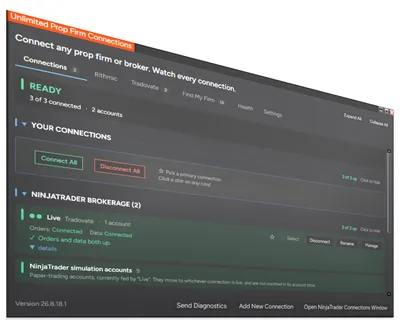
Unlimited Prop Firm Connections
Run multiple Rithmic connections in NinjaTrader 8
Connect and manage multiple Rithmic accounts at the same time, from one window, in NinjaTrader 8. Monitor every connection, and closely track your Tradovate API rate limits.
Every feature, free for 7 days. No credit card required.
Create your free accountSee what's free and what's paid in all our tools
Overview
Unlimited Prop Firm Connections lets you manage multiple Rithmic accounts at once, in one copy of NinjaTrader 8, on the PC you already own. It works with Rithmic for NinjaTrader Brokerage, and it is also a full connection manager: every connection you have, Rithmic or not, in one window.
Still on NinjaTrader 8.0.28.0, the last 8.0 release? This runs there too, and customers use it there today: one keeps Apex, Lucid Trading and Tradeify connected at the same time on 8.0.28.0. After you buy, request the 8.0.28.0 build in your Members Area or on live chat. What differs on 8.0.28.0
We have run five or more Rithmic prop firms connected simultaneously on one PC. No second computer and no VPS — your usual workspace, your usual charts, every account together in the Control Center.
What it does
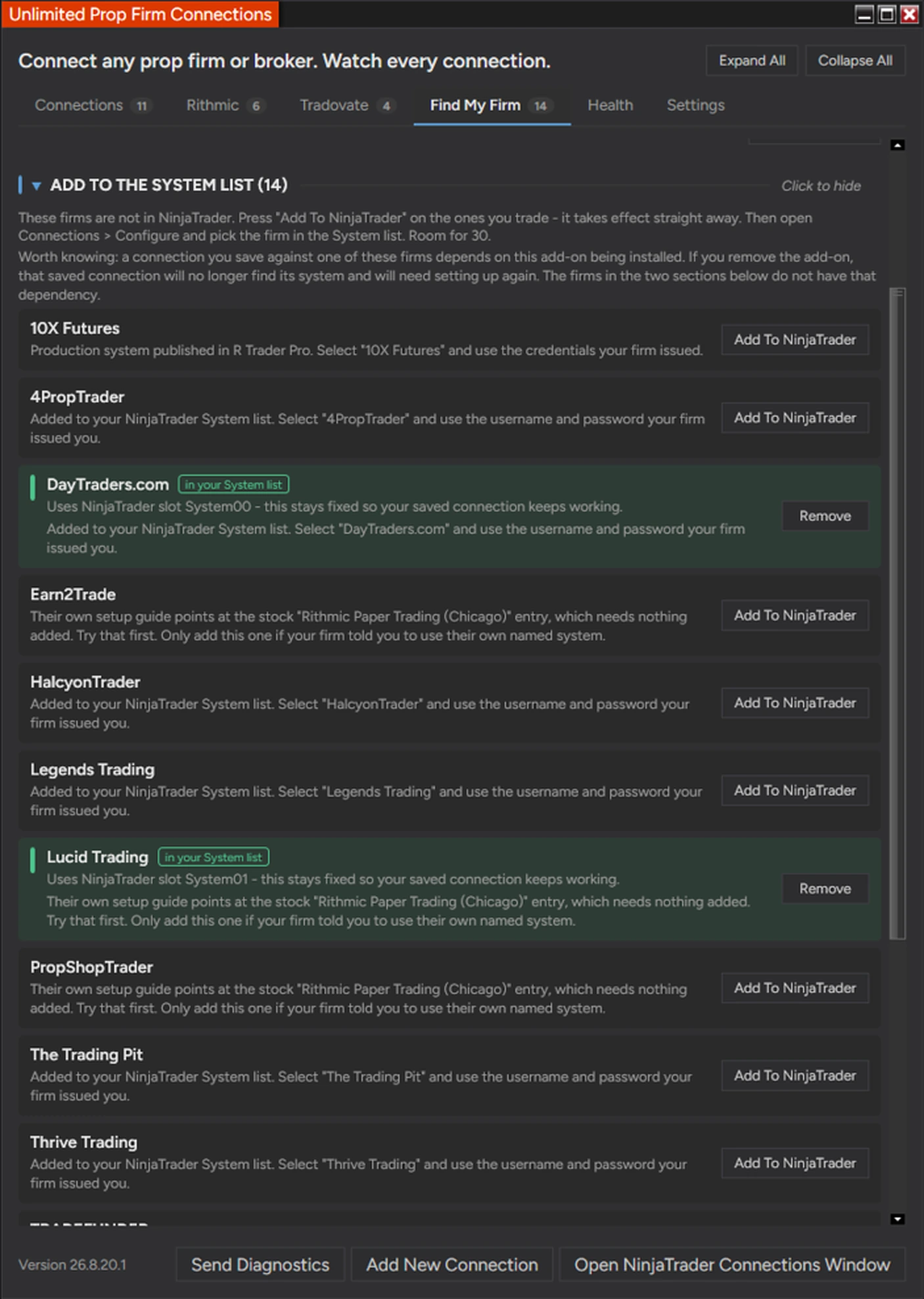
Names the right System entry for your firm — 100 prop firms and brokers already connect through an entry NinjaTrader ships, and this tells you the exact one, live or demo. Where your firm’s entry is missing, one click adds it. The catalog tracks 114 firms and updates itself.
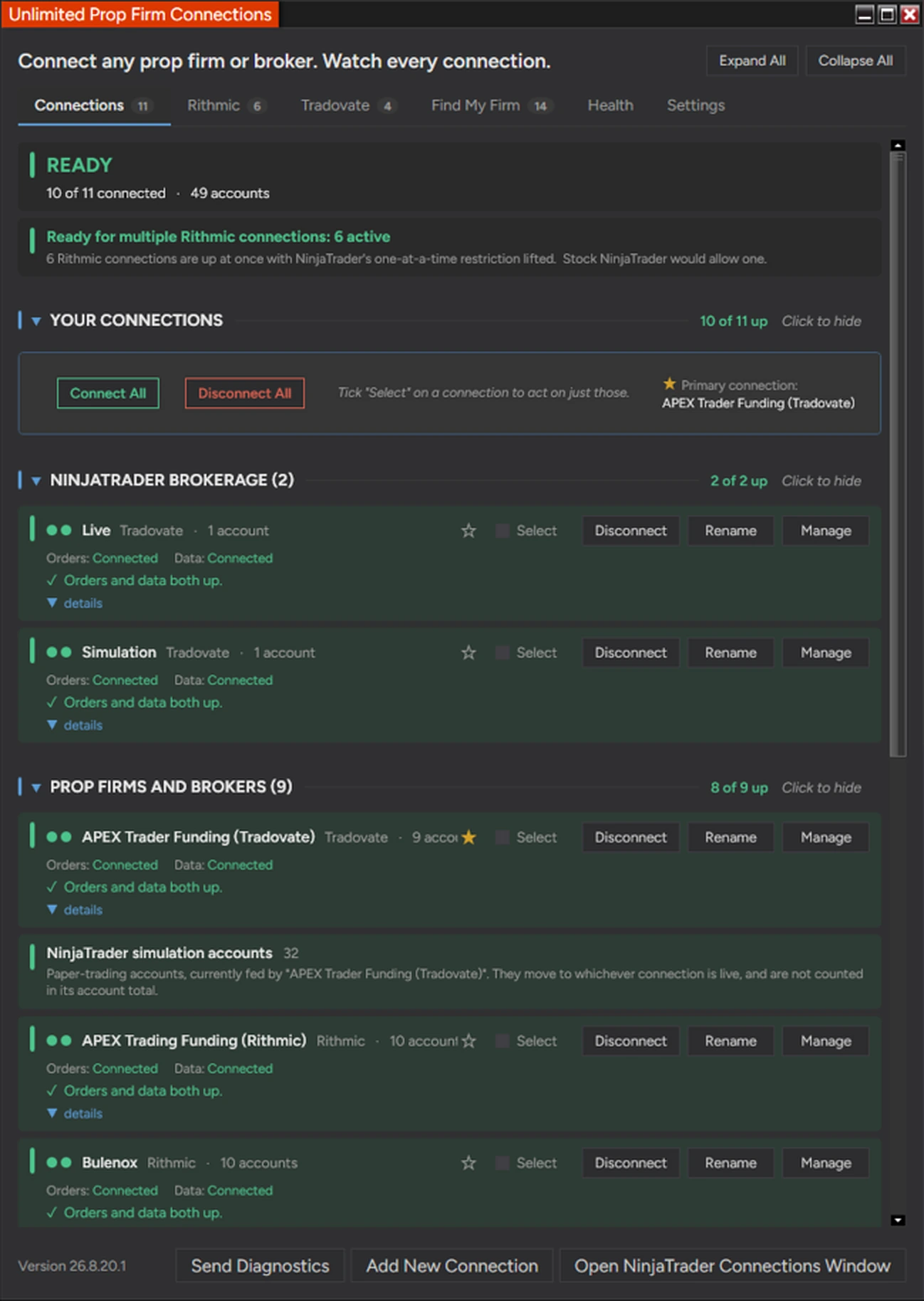
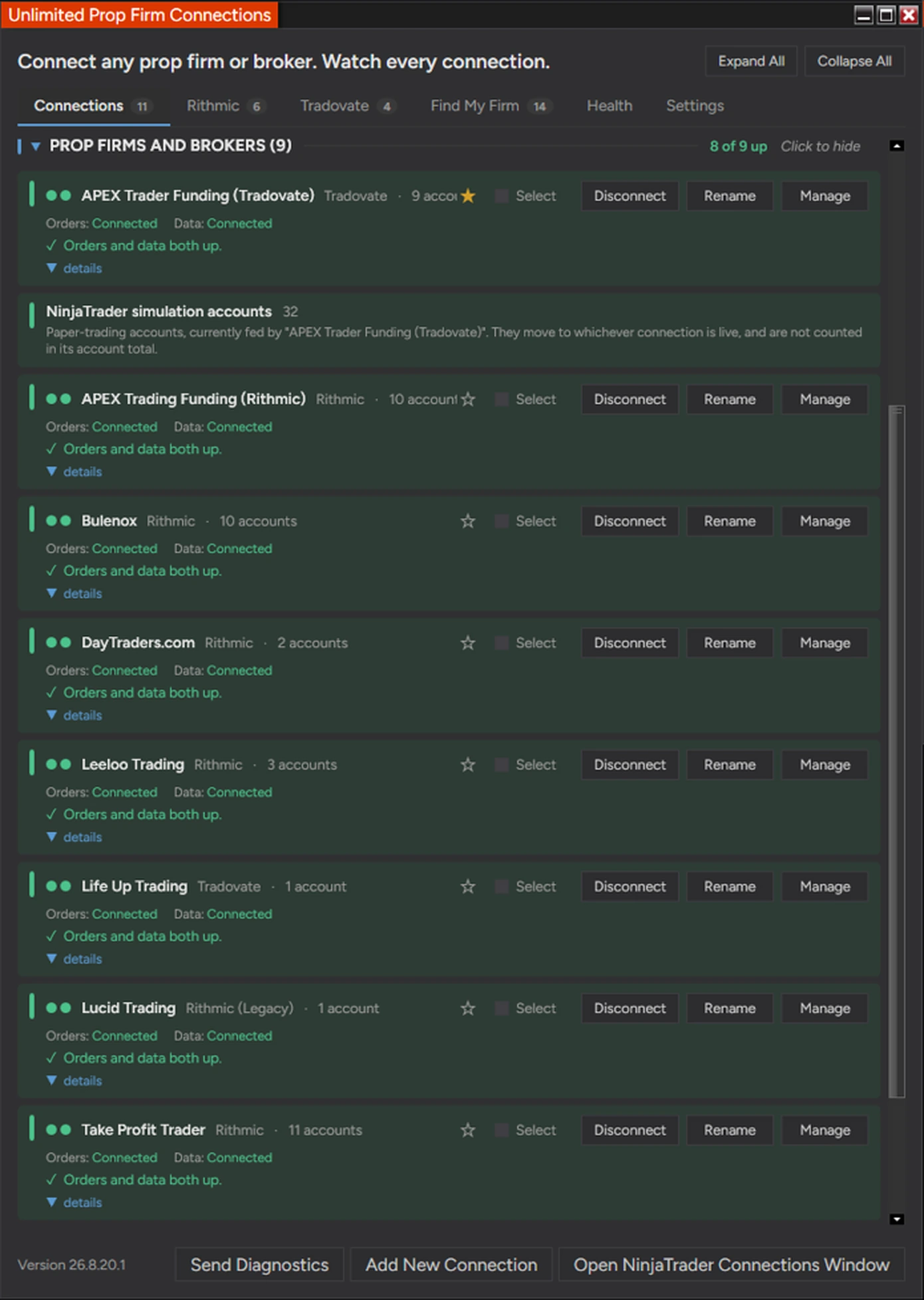
Every connection in one window — Connect or disconnect in one click, tick only the firms you want, and hand a provider from one connection to another. Disconnecting while you hold a position warns you first.
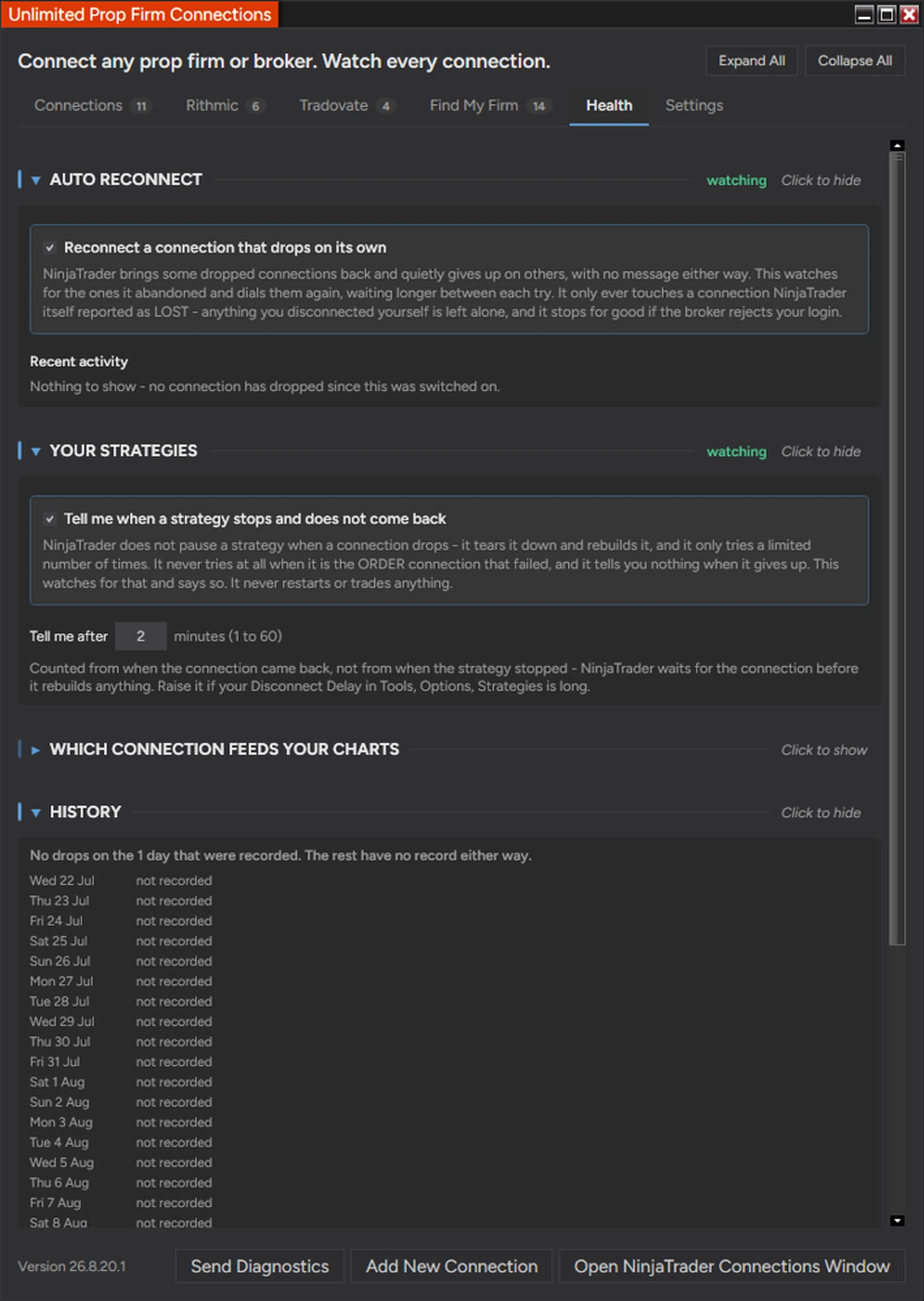
Tells you when a connection drops, and why — Two lights per connection, because your orders and your charts fail independently. A named cause with steps to fix it instead of a raw error code, an alert if one dies mid-trade, automatic reconnect, and 30 days of drop history.
Lets you copy trades between different Rithmic prop firms — If your accounts are on more than one Rithmic login, it lets you manage multiple Rithmic accounts at once, so a trade copier can reach all of them. Add the Accounts Dashboard Suite and one master account can drive followers at other firms. NinjaTrader has never limited Tradovate connections.
NinjaTrader has never limited Tradovate, so if every firm you trade is on Tradovate you do not need the connection half of this, though its Tradovate tab still watches your order activity and warns you the moment Tradovate refuses an order for its API rate limit. And your firm sets a session limit on your login: two different firms never compete, but the same login open in two places does.
If your Rithmic prop firm does not connect, or your Rithmic prop firms do not stay connected at the same time on your setup, tell us within 30 days of your purchase and give us 14 days to get it running. If we cannot, you get every dollar back. This covers any prop firm on a Rithmic data feed whose own terms allow NinjaTrader.
Related guides: Which prop firms work with NinjaTrader · Prop firm connection guides · Rithmic connection guide · How do I connect to multiple prop firms? · Rithmic vs Tradovate · Prop firm trade copier · Which System entry your firm uses · NinjaTrader 8.0.28.0 and Rithmic · A live broker account plus prop firms · Moved to a live Rithmic account
Affordable Indicators, Inc. is not affiliated with, sponsored by, or endorsed by Rithmic, NinjaTrader, or any prop firm or broker named on this page, and none of them endorse this product. All product and company names are the trademarks of their respective owners. Your agreement with your prop firm and your broker governs what you may do with your account, including how many connections you may run and how you may trade them — please confirm with your firm before you buy.
📦 What's Included
What Customers Are Saying
“I bought the Unlimited Prop Firm Connections and Duplicate Account Actions plugin for NinjaTrader and it is a game-changer. No need to use 2 platforms anymore - can just use 1 now! Joel is very helpful with anything you need and always goes beyond with the best customer service possible.”
“Trade copier from Affordable Indicators just works great! It has resolved all the issues and glitches found with other similar copiers, i.e. late fills, reverse position entries, slow updating PnL etc.”
Refund and Sales Policy
This product is covered by our 30-day money-back guarantee (details above). It covers the purchase price only, never trading results or losses on any account.
One limit, said plainly: this add-on runs inside NinjaTrader Desktop, so a NinjaTrader update could change what it can do. Within your 30 days, that is covered by the guarantee like any other problem. After that, if NinjaTrader ever changes the platform in a way that stops the add-on from working, that is outside our control and outside what any add-on can promise. We will tell you straight away if it happens, and we will keep working the problem.
Product licenses can only be used on the purchaser’s computer(s), and every purchase includes a lifetime license with free future updates.
Unlimited Prop Firm Connections Features & Benefits
Connect every Rithmic prop firm at once
More than one Rithmic connection at once
Manage multiple Rithmic accounts at once in one copy of NinjaTrader, on the PC you already own. We have run five or more Rithmic logins connected simultaneously on one machine, each one connected, disconnected and monitored from the same window.
Copy trades between different Rithmic prop firms
If your accounts are on more than one Rithmic login, it lets you manage multiple Rithmic accounts at once, so your copier can reach all of them. Six accounts across multiple firms ran off one master in testing, every order on the right account, dispatch between 0 and 3 milliseconds. NinjaTrader has never limited Tradovate connections.
Watches your Tradovate API rate limits
Tradovate refuses orders over its API limits, an hourly cap on new orders and a short burst limit on order changes, and a trade copier sends every order once per account. The Tradovate tab shows your last hour of order activity, warns you the moment Tradovate refuses an order for its rate limit, and can close your Tradovate positions in two clicks.
No second PC and no VPS
Run several Rithmic connections without either. One machine, one copy of NinjaTrader, your usual workspace and charts.
R|Trader Pro plug-in mode, if you want it
Optional. Shares one market data session instead of every connection opening its own, which conserves your session budget and can cut market data fees. The window works the arithmetic out for you.
Tells you exactly which System entry to pick
A hundred firms already connect through an entry NinjaTrader ships. Nobody tells you which one, so traders assume their firm is unsupported. Search your firm and it names the entry.
One click sets up your firm's connection
Where your account needs a System entry that is not already in your dropdown, one click adds it with the right settings. The catalog tracks 114 prop firms and brokers and updates itself, so new ones appear without a reinstall.
Manage and monitor every connection
Live account or demo, answered
The single most common Rithmic setup mistake there is. Live accounts and simulated prop accounts use different entries, and the catalog says which one your firm uses.
It will not overwrite a connection you are using
A saved NinjaTrader login remembers its slot, not its firm. If a slot is taken, this refuses and tells you, rather than silently repointing a saved connection at a different broker.
Connect and disconnect in one click
Every connection you have, in one list, each with its own button, covering everything in NinjaTrader and not only the Rithmic ones. Tick the firms you want and connect only those, or use Connect All, which skips any login your broker has already locked.
Disconnecting on a live position warns you first
Disconnecting never closes anything: the position stays live at your broker with your stop no longer managed. So it counts what is at stake, shows you the numbers, and asks. Idle connections stay one click.
Take a provider over in one click
Hand a provider from one connection to another without doing the dance by hand. It waits for the first to properly let go before connecting the second, which is the step that goes wrong manually.
Two lights per connection, not one
Your orders and your charts are two separate sessions and they fail independently. NinjaTrader shows one light for both, so a frozen chart and a dead order router look identical in the Control Center. This shows them separately.
Alerts you the moment a connection dies in a trade
A sound and a window straight away if the order session drops while you are holding contracts. It stays quiet when you disconnect on purpose, so the alert keeps its meaning.
A straight answer on why it failed
Not just "disconnected", and not your broker's raw error code. The specific cause, with numbered steps to fix it. Where the evidence does not separate two possible causes, it says so.
Strategy Guardian (in the next update)
30 days of drop history
Every drop, how long it lasted, and what you were holding at the time. Everything dropped together and it is your PC or your internet. One dropped alone and it is that firm. Neither you nor your firm can tell those apart alone.
Know when your automation stopped
Watches every NinjaScript strategy you have enabled, with or without a chart open. When one stops and stays stopped, you are told - including the case NinjaTrader has no message for at all, when it is the order connection that failed rather than the data feed.
The clock starts when your connection comes back
NinjaTrader rebuilds a strategy shortly after the connection returns, so a plain timer would alert you while it was already on its way back. Strategy Guardian measures how long your connection has been healthy instead, so an alert means something is genuinely wrong.
Your strategy settings, read back to you
Connection loss handling, disconnect delay, how many restarts you actually get, and whether your working entries and exits are cancelled on disable or left live at your broker. All of it sits in a dialog most traders have never opened, and all of it decides what happens during an outage.
Included with your purchase
Lifetime Purchase
A one-time purchase with a lifetime license — no monthly or yearly fees. Buy once and it stays yours across every future version.
Free Updates
Free lifetime upgrades — every new feature and improvement is included at no extra cost, updated regularly from trader feedback.
Customer Support
Human live-chat support included with every license — real people who usually reply within minutes, before and after you buy.
Video Overview
Watch this overview, or browse more on our YouTube channel.

Reviews
Every review here is a genuine customer review from Trustpilot, Google and our YouTube community — never fabricated.
Leave a review →Trade copier from Affordable Indicators just works great! It has resolved all the issues and glitches found with other similar copiers, i.e. late fills, reverse position entries, slow updating PnL etc. The risk management features works instantly to stop trades beyond set profit for the day when managing multiple firms with different consistency restrictions. Thanks to their connection tool, login multiple Rithmic prop works now which is very handy keeping everything in one place and trade with large number of accounts!
The chart trader works excellently without causing any additional drag on PC resources, PnL updates instantly on all brackets on every chart open and break even, click buy/sell works without fail. And above all these fantastic features, customer service is top notch! Joel (Owner himself) would chat with you and resolve any technical difficulties with the products, even if it's Saturday afternoon! The team at AI listens to the feedback and make quick updates to their products, which is greatly appreciated.
I bought the Unlimited Prop Firm Connections and Duplicate Account Actions plugin for NinjaTrader and it is a game-changer.
No need to use 2 platforms anymore - can just use 1 now!
Joel is very helpful with anything you need and always goes beyond with the best customer service possible.
No reviews at this rating yet.
Customer satisfaction is our highest priority. We use Trustpilot and Google Reviews for full transparency.
Screenshots
Setup
System Requirements
| Platform | NinjaTrader Desktop (NinjaTrader 8) |
| NinjaTrader versions | NinjaTrader 8.1.x.x (every 8.1 release, including the latest, 8.1.8.4) and NinjaTrader 8.0.28.0. On 8.0.28.0? After you buy, request the 8.0.28.0 build in your Members Area or ask us on live chat. |
| Type | Add-on, installed from the Control Center |
| License | Lifetime, 1 PC or 2 PC options available |
| Connections watched | Every connection in NinjaTrader, Rithmic, Tradovate and the rest |
| Multi-connection | Rithmic, including Rithmic for NinjaTrader Brokerage |
| Drop history | 30 days, recorded on your own PC |
| Connection setup | One click adds your firm's System entry when it is missing |
| Firms named | 100 that already connect natively, with the exact entry to pick |
| Catalog | 114 prop firms and brokers tracked, updated without a reinstall |
| Session limits | Set by your firm on your Rithmic login, not by this add-on |
| Support | Live chat support included with every license |
| Updates | Free lifetime upgrades |
Installation
After purchase your download is available instantly in your Members Area. Import the file into NinjaTrader Desktop the same way you would any other add-on, then restart NinjaTrader.
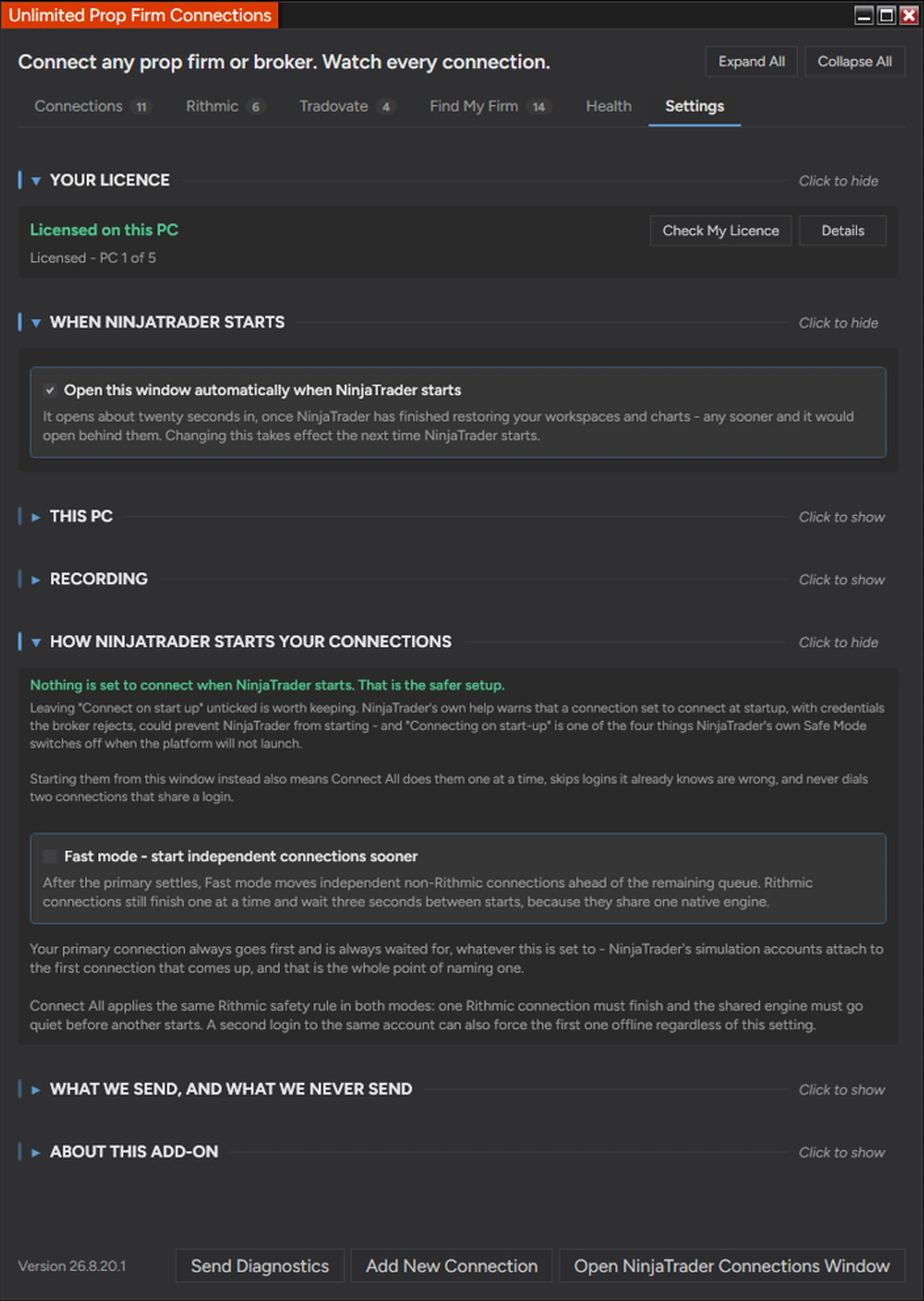
You will find it at Control Center, then New, then Affordable Indicators, then Rithmic Connector. Search your firm, and it tells you which System entry to pick or adds the entry for you. Then connect the way you normally would from the Control Center.
After purchase
Live chat support is included with every license, and so are free lifetime updates. New firms appear in the catalog without you reinstalling anything. You can also join the Discord community.
Good to Know
Which NinjaTrader version does this work with?
It is built for NinjaTrader Desktop (NinjaTrader 8) on Windows: every 8.1.x.x release, including the latest, 8.1.8.4, and NinjaTrader 8.0.28.0. On 8.0.28.0, request the 8.0.28.0 build in your Members Area or ask us on live chat after you buy. Like every NinjaTrader add-on, it does not run on NinjaTrader Web or the NinjaTrader mobile app.
Is this a one-time purchase or a subscription?
A one-time purchase. Every license includes a lifetime license with free future updates — no recurring fees.
Can I use it on more than one computer?
Yes — choose the 2 PC license option at checkout to run it on a second computer.
Do I get free updates?
Yes — free lifetime updates. New versions appear automatically in your Members Area.
What support is included?
Human chat support plus our active Discord community, backed by 18 years of NinjaTrader programming experience.
What is your refund policy?
This product is covered by our 30-day money-back guarantee, which for this add-on covers two things: that your Rithmic prop firm connects, and that multiple Rithmic prop firms stay connected at the same time.
If either one does not hold on your setup, tell us within 30 days of your purchase and give us 14 days to get it working. If we cannot, you get every dollar back. This applies to any prop firm on a Rithmic data feed whose own terms allow NinjaTrader, and it never covers trading results or losses on any account.
One limit, said plainly: this add-on runs inside NinjaTrader Desktop, so a NinjaTrader update could change what it can do. Within your 30 days, that is covered by the guarantee like any other problem. After that, if NinjaTrader ever changes the platform in a way that stops the add-on from working, that is outside our control and outside what any add-on can promise. We will tell you straight away if it happens, and we will keep working the problem.
Release Notes
Prop firm connections change all the time. New firms, new Rithmic systems, new NinjaTrader versions, and every firm sets up its servers a little differently.
Here is what we have shipped recently to keep every connection working.
-
October 28, 2026 Version 26.10.28.1 Latest
- NewOrder check after a reconnect
- NewAuto reconnect keeps trying, even with the window closed
- NewCheck for Updates
- ImprovedWaits out Rithmic weekend maintenance
- FixedYour login saved under the default name
+ 2 more changes in the full release notes -
October 18, 2026 Version 26.10.18.1
- NewUpdate right in the window
- ImprovedA patient Rithmic reconnect
- ImprovedLicensed the moment you return
- FixedCOMEX routing for your own Rithmic firms
+ 1 more change in the full release notes -
October 10, 2026 Version 26.10.10.1
- NewSpots a Tradovate order NinjaTrader can’t read
- ImprovedReconnect brings back a half-down connection
- ImprovedFaster diagnostics
- FixedOrders keep routing on long sessions
+ 1 more change in the full release notes -
October 4, 2026 Version 26.10.4.1
- NewAdd a connection by picking your firm
- NewA Quick Start guide
- NewOpens when you connect
- ImprovedCatches a connection added as the wrong type
- ImprovedA slow connection gets another try
+ 6 more changes in the full release notes -
September 17, 2026 Version 26.9.17.1
- NewTradovate Activity replaces the API rate limit gauges
- NewGroup by connection type
- ImprovedConnected filter and a wider minimum window
- FixedCompiling other scripts no longer asks you to reopen
+ 1 more change in the full release notes -
September 14, 2026 Version 26.9.14.1
- NewAll Connections, in one place
- NewSaved selections
- NewTradovate API rate limits, measured live
- ImprovedFind My Firm is now a searchable directory
- FixedStrategy Guardian, fewer false alarms
+ 7 more changes in the full release notes
Show 5 earlier updates, back to June 22, 2026
-
August 25, 2026 Version 26.8.25.1
- NewThe update offer lives in the window now
- ImprovedDisconnect All, Connect All, again and again
- ImprovedThe green dots stay right
- FixedCompatibility improvements
+ 2 more changes in the full release notes -
August 20, 2026 Version 26.8.20.1
- NewAuto reconnect
- NewChoose your primary connection
- ImprovedYour firms are in the System list immediately
- ImprovedNinjaTrader 8.1.3.1 and 8.0.28 compatibility
+ 2 more changes in the full release notes -
August 18, 2026 Version 26.8.18.1
- NewStrategy Guardian
- NewA much faster Connect All
- NewOpens with NinjaTrader
- FixedYour login details are remembered
- FixedCards that follow the connection
+ 3 more changes in the full release notes -
August 14, 2026 Version 26.8.14.1
- NewA Health tab, and one verdict before the open
- NewTwo lights per connection
- NewIt tells you why a connection failed, and what to do
- FixedLicense fixes
- FixedAccuracy, wording and speed
+ 5 more changes in the full release notes -
June 22, 2026 Version 26.6.22.1
- NewConnect Several Rithmic Prop Firms At Once
- NewAdd Prop Firms NinjaTrader Doesn’t Ship
- NewTells You Which Firms Need Nothing At All
+ 10 more changes in the full release notes
Frequently Asked Questions
How do I run multiple Rithmic connections at the same time in NinjaTrader?
Unlimited Prop Firm Connections lets you connect and manage multiple Rithmic accounts at the same time, from one window. Once it is installed, open it from the Control Center (New, then Affordable Indicators, then Rithmic Connector), then connect each Rithmic prop firm in NinjaTrader's usual Connections window. Every firm stays connected side by side in one copy of NinjaTrader, using the logins you already have.
How do I connect multiple Rithmic accounts in NinjaTrader?
It depends on where the accounts are. Several accounts at the same prop firm usually sit on one Rithmic login, and that one connection already carries every account on it, so you need nothing extra. Accounts on different Rithmic logins each need their own connection, and NinjaTrader Desktop runs one Rithmic connection at a time. If your accounts are on more than one Rithmic login, Unlimited Prop Firm Connections lets you manage multiple Rithmic accounts at once, from one window.
How many Rithmic prop firm accounts can I connect at once?
The add-on itself sets no limit. Connecting a third or fourth Rithmic firm works the same way as the second, and we have run five or more Rithmic prop firms connected at the same time on one PC. What does limit you is your computer. What each Rithmic login allows is set by your prop firm's and Rithmic's own terms, so check those with them.
Do I need a VPS or a second computer for multiple Rithmic connections in NinjaTrader?
No. Traders are often told to use a VPS or a second PC because NinjaTrader Desktop runs one Rithmic connection at a time. With this add-on, the connections run side by side in one copy of NinjaTrader on the PC you already have, with your usual workspace and charts. It also runs on a VPS. Avoid opening the same Rithmic login in two places at once, because both sessions count against your firm's session limit.
Which Rithmic System entry should I pick for my prop firm in NinjaTrader?
Picking the wrong System entry is the most common Rithmic setup mistake. Many prop firm evaluation and demo accounts use "Rithmic Paper Trading (Chicago)", while live brokerage accounts use a "Rithmic 01" entry. The add-on tracks more than 100 prop firms and brokers, names the exact entry each one uses, live or demo, and adds the entry to NinjaTrader in one click when it is missing. It works with Rithmic for NinjaTrader Brokerage.
Can I copy trades between different Rithmic prop firms in NinjaTrader?
Yes, once the connections are open at the same time. If your accounts are on more than one Rithmic login, Unlimited Prop Firm Connections lets you manage multiple Rithmic accounts at once, from one window. A trade copier, such as the Accounts Dashboard Suite, then lets one master account drive follower accounts at completely different firms. NinjaTrader has never limited Tradovate connections.
Do I need Unlimited Prop Firm Connections for Tradovate prop firm accounts?
Not to connect them. NinjaTrader has never limited Tradovate connections, so several Tradovate accounts already run side by side with nothing installed. For Tradovate, the add-on watches the API rate limits instead. Tradovate refuses orders over its limits (an hourly cap on new orders and a short burst limit on order changes), and a trade copier sends each order once per account, which adds up fast.
The Tradovate tab shows your order activity for the last 60 minutes, warns you the moment Tradovate refuses an order for its rate limit, and can try to close all your Tradovate positions in two clicks, or automatically after a rate-limit refusal if you switch that on. It cannot see how much of your limit is left, stop a limit from being reached, or guarantee an exit. It also covers NinjaTrader Brokerage accounts on NinjaTrader's own connection, which runs on Tradovate.
Does Unlimited Prop Firm Connections work on NinjaTrader 8.0.28.0?
Yes. It runs on NinjaTrader 8.0.28.0 as well as the current 8.1 releases, and holding several Rithmic logins works the same on both. One difference: 8.0.28.0 has a fixed System list, so for firms that run their own Rithmic system the Find My Firm tab shows a How to Set Up button with that firm's steps instead of adding an entry. The 8.0.28.0 build is available after you buy, through your Members Area or live chat.
You may also like



 Unlimited Prop Firm Connections