
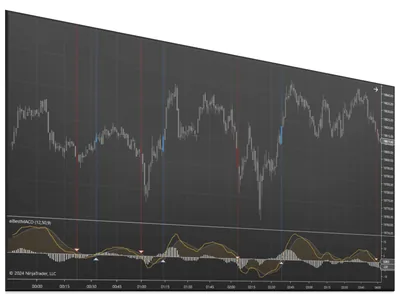
Best MACD Indicator
A flexible NinjaTrader MACD with multi-time-frame analysis, crossover signal icons, alerts, and Signal Entry Orders integration.
Overview
The Best MACD Indicator gives traders a more flexible way to work with the classic Moving Average Convergence Divergence. As a momentum indicator, MACD shows the strength or weakness of a price move and highlights possible buy or sell points.
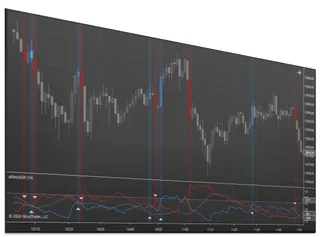
This version plots the MACD line, signal line, and histogram using the standard 12, 26, and 9 exponential moving averages, then adds crossover highlighting, signal icons, multi-time-frame analysis, and alerts. It’s built for traders who want to track momentum and respond to MACD crossover opportunities more efficiently in NinjaTrader.
📦 What's Included
Refund and Sales Policy
30-day money-back guarantee. If this product does not work as advertised, report it within 30 days of your purchase and give us 14 days to resolve the issue. If we cannot, you get a full refund. The guarantee covers the purchase price only, never trading results or losses on any account. Read the full terms.
Product licenses can only be used on the purchaser's computer(s). All purchases include a lifetime license with free future updates.
Best MACD Indicator Features & Benefits
Crossover Highlighting
Draws attention to MACD crossover activity on the chart or indicator.
Signal Icons
Customizable signal icons over crossovers make possible trade signals easier to identify visually.
Included Signal Types
Signals MACD Zero Cross, Histogram Zero Cross, and Slope Change In Extreme conditions.
Multi Time Frame
Use on any chart with a secondary data feed: Tick, Volume, Range, Second, Minute, or Renko.
Custom Moving Average
Choose a custom moving average type to tailor the indicator to your preferences.
Signal Entry Orders
Integrates with Signal Entry Orders for semi-automated order execution.
Flexible Alerts
Includes text, email, sound, and popup notification options.
Included with your purchase
Lifetime Purchase
A one-time purchase with a lifetime license — no monthly or yearly fees. Buy once and it stays yours across every future version.
Free Updates
Free lifetime upgrades — every new feature and improvement is included at no extra cost, updated regularly from trader feedback.
Customer Support
Human live-chat support included with every license — real people who usually reply within minutes, before and after you buy.
No video for this one yet
We have been heads down building Best MACD Indicator instead of filming it. Guilty.
If seeing it move would help you decide, just ask. Tell us what you want to see and we will bump it to the top of the recording list. We would rather make the video you actually need than guess.
In the meantime, we answer questions with real humans, usually within minutes. Ask us anything about Best MACD Indicator and we will show you exactly how it works.
Plenty of walkthroughs are on the channel already. This one is just next in line.
Requirements & Setup
System Requirements
| Platform | NinjaTrader Desktop (NinjaTrader 8) |
| NinjaTrader versions | NinjaTrader 8.1.x.x (every 8.1 release, including the latest, 8.1.8.3) and NinjaTrader 8.0.28.0. On 8.0.28.0? After you buy, request the 8.0.28.0 build in your Members Area or ask us on live chat. |
| License | Lifetime — 1 PC or 2 PC options available |
| Support | Human chat support included with every license |
| Updates | Free lifetime upgrades — updated regularly based on trader feedback |
Installation
After purchase, your download is available instantly in your Members Area. Import the file into NinjaTrader Desktop, then follow the included step-by-step user manual and video guide. Need help? Use our human chat support or join the Discord community.
Good to Know
Which NinjaTrader version does this work with?
It is built for NinjaTrader Desktop (NinjaTrader 8) on Windows: every 8.1.x.x release, including the latest, 8.1.8.3, and NinjaTrader 8.0.28.0. On 8.0.28.0, request the 8.0.28.0 build in your Members Area or ask us on live chat after you buy. Like every NinjaTrader add-on, it does not run on NinjaTrader Web or the NinjaTrader mobile app.
Is this a one-time purchase or a subscription?
A one-time purchase. Every license includes a lifetime license with free future updates — no recurring fees.
Can I use it on more than one computer?
Yes — choose the 2 PC license option at checkout to run it on a second computer.
Do I get free updates?
Yes — free lifetime updates. New versions appear automatically in your Members Area.
What support is included?
Human chat support plus our active Discord community, backed by 18 years of NinjaTrader programming experience.
What is your refund policy?
This product is covered by our 30-day money-back guarantee. If it does not work as advertised, report it within 30 days of your purchase and give us 14 days to resolve the issue. If we cannot, you get a full refund. It covers the purchase price only, never trading results or losses on any account. See the full terms.
Frequently Asked Questions
What is the MACD indicator and how does it work?
MACD, short for Moving Average Convergence Divergence, is a momentum indicator that shows the strength or weakness of a price move and highlights possible buy or sell points. It plots the MACD line, a signal line, and a histogram that measures the difference between the two. The Best MACD Indicator builds these plots from the standard 12, 26 and 9 period exponential moving averages.
How is the Best MACD Indicator different from the MACD in NinjaTrader 8?
NinjaTrader 8 includes a standard MACD plot. The Best MACD Indicator adds crossover highlighting, customizable signal icons over crossovers, multi time frame calculations, and sound, NinjaTrader alert and email notifications. It also connects to Signal Entry Orders, so a MACD signal can submit an entry through the Enhanced Chart Trader instead of only appearing on the chart.
Which MACD crossover signals does the indicator plot?
You can choose one of three MACD signals in the Signals setting. MACD Zero Cross marks the MACD line crossing the zero level. Histogram Zero Cross marks the histogram crossing zero. Slope Change In Extreme marks the MACD slope turning up while above zero, or turning down while below zero. Crossover activity can also be highlighted on the chart or the indicator panel, with signal icons you can customize.
Can I get an alert when the MACD crosses in NinjaTrader?
Yes. When the signal you chose fires, the Best MACD Indicator can play a sound, post a NinjaTrader alert and send an email, so you are notified when a signal condition occurs without watching the chart all day. Each event is also marked on the chart with crossover highlighting and a signal icon, so you can review where the MACD crossed after the fact.
Does the MACD indicator work on multiple time frames and Renko charts in NinjaTrader 8?
Yes. The multi time frame feature lets you add the indicator to any chart window and calculate it from a secondary data feed: Tick, Volume, Range, Second, Minute, or Renko. That lets you follow MACD momentum from one bar type or time frame while you trade from a different chart.
Can MACD signals place trades automatically in NinjaTrader?
They can be semi automated. The Best MACD Indicator integrates with Signal Entry Orders, an Enhanced Chart Trader module sold separately. You arm a buy or sell signal button, and when the MACD signal occurs an entry order is submitted using the account, quantity and ATM strategy already set on the Enhanced Chart Trader panel.
Does it work with NinjaTrader 8.0.28.0?
Yes. It runs on every NinjaTrader 8.1.x.x release, including the latest, 8.1.8.3, and on NinjaTrader 8.0.28.0, the last 8.0 release. 8.0.28.0 takes its own build: after you buy, request it in your Members Area (NinjaScript Downloads, then NinjaTrader 8.0.28.0) or ask us on live chat and we will set you up.
You may also like
 Best MACD Indicator