
Order Flow Trading
There are many ways to trade order flow information. Order flow shows important information about orders being placed in the market. This data can reveal information such as the number of contracts traded at the bid or ask, the overall delta, block trades, order imbalances and more. Below is a screenshot from our Order Flow System and Execution Tools. If you want to learn more about this product, you can find additional information here on the Impact Order Flow Entry Orders page. The indicator on its own is Impact Order Flow, our NinjaTrader order flow indicator.
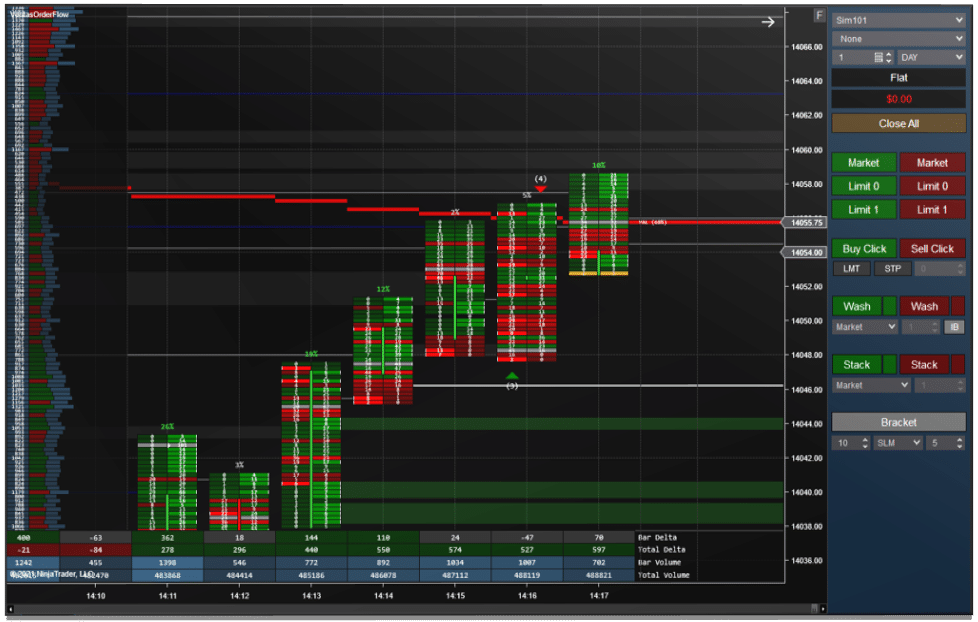
Key Order Flow Terms
Bid and ask: The bid is the highest price buyers are waiting to pay, and the ask is the lowest price sellers are waiting to accept. A market buy order trades at the ask and a market sell order trades at the bid, so trades at the ask show aggressive buyers and trades at the bid show aggressive sellers.
Footprint chart: A footprint chart splits each bar into its price levels and shows how many contracts traded at the bid and at the ask at every price. In NinjaTrader Desktop this view comes from Volumetric bars.
Imbalance: An imbalance is a price level where buying at the ask is much larger than selling at the bid next to it, or the other way around. Several stacked imbalances in a row often show strong one sided pressure.
Absorption and exhaustion: Absorption is when heavy aggressive selling or buying hits a price but the price does not move, because large passive orders are taking the other side. Exhaustion is when a move runs out of aggressive orders and volume dries up at the extreme.
How Traders Use Order Flow
Most traders do not read order flow on every bar. They mark important levels first, such as support and resistance or the prior day high and low, and then watch the order flow when price reaches those levels for signs that the level is holding or breaking.
Mistakes to Avoid
Order flow describes what has already traded, so it works best with context. Avoid reacting to every single imbalance, and remember that quiet sessions produce much smaller numbers than the regular session open.
Frequently Asked Questions
Do I need special data for order flow? Yes. Order flow tools need tick data from your data feed. To compare order flow tools for NinjaTrader, see our order flow software section.
Do I need the DOM for order flow? Not always. The DOM (depth of market) shows resting limit orders waiting at each price, while footprint and delta show orders that have already traded. Many traders use both, since resting orders can be pulled before price reaches them.
What imbalance setting should I use? There is no single correct setting. A higher ratio shows fewer, stronger imbalances and a lower ratio shows more of them. Adjust it to the instrument and session, since a busy contract produces far more imbalances than a quiet one.