

Impact Order Flow Entry Orders
A semi-automated order flow trading package that triggers entries from stacked imbalances, block trades, or washout signals.
Overview
The Impact Order Flow Entry Orders is our semi-automated trading package for NinjaTrader order flow needs. Semi-automated trades can be triggered based on stacked imbalances, block trades, or washout signals.
This is a bundled product that includes the Impact Order Flow Indicator plus three Enhanced Chart Trader products: Basic Chart Trader Tools, Order Flow Entry Orders, and Close Bar Entry Orders. With everything built into the Impact Order Flow Indicator, the team continually adds new features based on user feedback.
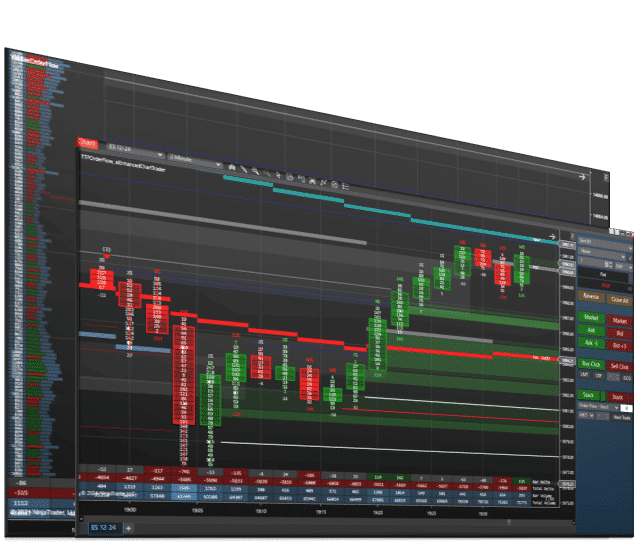
Here is how the pieces work together. The Impact Order Flow Indicator shows you where the imbalances, block trades, washouts and unfinished auctions are, along with the daily high, low, VWAP and value area. Order Flow Entry Orders places the entry for you when one of those signals appears: set how many stacked imbalances in a row it takes (3 to 5 bid or ask imbalances is the recommended range), or trigger off block trades and washouts instead. Prefer confirmation? Close Bar Entry Orders submits your entry the moment the bar closes, and Basic Chart Trader Tools handles the rest of the trade, from click entries and a breakeven button to P/L right on your chart.
Please only purchase this software if you are familiar with order flow. We do not teach order flow. Order Flow Entry Orders requires the Order Flow + premium feature set for NinjaTrader Desktop.
📦 What's Included
What Customers Are Saying
“The Indicator I bought works great, and has improved my trading a lot. Great customer service. They see things through to make sure all questions and issues are resolved.”
Refund and Sales Policy
30-day money-back guarantee. If this product does not work as advertised, report it within 30 days of your purchase and give us 14 days to resolve the issue. If we cannot, you get a full refund. The guarantee covers the purchase price only, never trading results or losses on any account. Read the full terms.
Product licenses can only be used on the purchaser's computer(s). All purchases include a lifetime license with free future updates.
Impact Order Flow Entry Orders Features & Benefits
Semi-Automated Entries
Trigger semi-automated trades based on stacked imbalances, block trades, or washout signals.
Customizable Bar Display
Set Print Mode, Color Mode, Opacity Mode, Body Mode, and Above Bar options to build your perfect order flow chart.
Imbalance & Momentum Zones
Create zones from diagonal bid/ask imbalances and from the difference between current and previous bar formations.
Swing & Magnet Levels
Plot trend-based support and resistance levels and mark price levels where bid and ask volume are nearly identical.
Washout & Unfinished Auctions
Detect diagonal bid/ask washout imbalances and locate price levels containing both buys and sells.
Block Trades
Reveal the price levels where large order quantities were traded and the number of contracts involved.
Daily Reference Levels
Plot Daily High, Daily Low, VWAP, Point of Control, and Value Area High/Low by default.
Also Included: Close Bar Entry OrdersView Product
Your Impact Order Flow Entry Orders license also includes the complete Close Bar Entry Orders:
Bar-Close Entries
Submit an entry order automatically the instant the current bar closes, with one click.
Multiple Order Types
Place a Market, Limit, Stop, or Stop Limit order based on how the bar closes.
Direction Conditions
Trigger long or short entries on an up bar, down bar, or any bar close.
Price Basis Options
Place the order at the bar close, or above the high / below the low, with a tick offset.
Price-Level Trigger
Select a price level on the chart and enter when price closes beyond it.
One-Click Cancel
Cancel the pending close-bar logic at any time by clicking the button again.
Also Included: Basic Chart Trader ToolsView Product
Your Impact Order Flow Entry Orders license also includes Basic Chart Trader Tools. Highlights:
Click Entry Buttons
Click and drag orders onto your chart and switch between LMT, MIT, STP, and SLM orders with a customizable tick offset.
Limit Order Buttons
Create customizable limit or MIT entry buttons with adjustable tick offsets and a choice of Ask, Bid, Offer, or Spread.
Attach to Indicator
Attach a stop or target order to any NinjaTrader indicator in one click, with tick offsets and track or trail mode.
Micro/Mini Crossover
Keep your chart on the mini (like ES) and trade the micro (MES) instead — or the reverse — without switching charts or reloading the instrument.
Breakeven Button
Optionally add a breakeven button in the chart window with the entry line display or in the control panel area.
Profit & Loss Display
Show or hide P/L in ticks, points, or dollars, view daily P/L with or without commissions, and break it out per instrument.
Executions Display
Improves on the standard NinjaTrader display, showing details such as time in the trade and total profit in your chart window.
Included with your purchase
Lifetime Purchase
A one-time purchase with a lifetime license — no monthly or yearly fees. Buy once and it stays yours across every future version.
Free Updates
Free lifetime upgrades — every new feature and improvement is included at no extra cost, updated regularly from trader feedback.
Customer Support
Human live-chat support included with every license — real people who usually reply within minutes, before and after you buy.
Video Overview
Watch this overview, or browse more on our YouTube channel.

Reviews
Every review here is a genuine customer review from Trustpilot, Google and our YouTube community — never fabricated.
Leave a review →The Indicator I bought works great, and has improved my trading a lot. Great customer service. They see things through to make sure all questions and issues are resolved.
Helpful and friendly customer service.
No reviews at this rating yet.
Customer satisfaction is our highest priority. We use Trustpilot and Google Reviews for full transparency.
Screenshots

Requirements & Setup
System Requirements
| Platform | NinjaTrader Desktop (NinjaTrader 8) |
| NinjaTrader versions | NinjaTrader 8.1.x.x (every 8.1 release, including the latest, 8.1.8.4) and NinjaTrader 8.0.28.0. On 8.0.28.0? After you buy, request the 8.0.28.0 build in your Members Area or ask us on live chat. |
| License | Lifetime — 1 PC or 2 PC options available |
| Support | Human chat support included with every license |
| Updates | Free lifetime upgrades — updated regularly based on trader feedback |
Installation
After purchase, your download is available instantly in your Members Area. Import the file into NinjaTrader Desktop, then follow the included step-by-step user manual and video guide. Need help? Use our human chat support or join the Discord community.
Good to Know
Which NinjaTrader version does this work with?
It is built for NinjaTrader Desktop (NinjaTrader 8) on Windows: every 8.1.x.x release, including the latest, 8.1.8.4, and NinjaTrader 8.0.28.0. On 8.0.28.0, request the 8.0.28.0 build in your Members Area or ask us on live chat after you buy. Like every NinjaTrader add-on, it does not run on NinjaTrader Web or the NinjaTrader mobile app.
Is this a one-time purchase or a subscription?
A one-time purchase. Every license includes a lifetime license with free future updates — no recurring fees.
Can I use it on more than one computer?
Yes — choose the 2 PC license option at checkout to run it on a second computer.
Do I get free updates?
Yes — free lifetime updates. New versions appear automatically in your Members Area.
What support is included?
Human chat support plus our active Discord community, backed by 18 years of NinjaTrader programming experience.
What is your refund policy?
This product is covered by our 30-day money-back guarantee. If it does not work as advertised, report it within 30 days of your purchase and give us 14 days to resolve the issue. If we cannot, you get a full refund. It covers the purchase price only, never trading results or losses on any account. See the full terms.
Frequently Asked Questions
What is Impact Order Flow Entry Orders for NinjaTrader 8?
Impact Order Flow Entry Orders is a semi-automated order flow trading package for NinjaTrader 8. It bundles the Impact Order Flow Indicator with three Enhanced Chart Trader products: Order Flow Entry Orders, Close Bar Entry Orders and Basic Chart Trader Tools. The indicator shows where imbalances, block trades and washouts form, and the chart trader places an entry when one of those signals appears.
How does Impact Order Flow Entry Orders enter trades on stacked imbalances in NinjaTrader?
Order Flow Entry Orders places the entry when a qualifying signal appears on your chart. For stacked imbalances you set how many bid or ask imbalances in a row it takes, and 3 to 5 is the recommended range for an entry with momentum. Block trade entries use a minimum size, washout entries use declining levels with optional bar direction and range filters, and a limit offset sets the entry price.
Do I need NinjaTrader Order Flow+ for Impact Order Flow Entry Orders?
Yes. Order Flow Entry Orders, the part of this package that places the trades, requires the Order Flow+ premium feature set for NinjaTrader Desktop. NinjaTrader includes Order Flow+ with a Lifetime plan or offers it as a monthly add-on. You can check yours under Settings, Account Plan, Plan Add-ons after logging in to your NinjaTrader account.
Is Impact Order Flow Entry Orders fully automated?
No, it is semi-automated. You choose the signals and settings on your chart, and the Enhanced Chart Trader places the entry when a qualifying signal appears. The IB button decides whether signals can fire mid-bar or only on a completed bar, the Time Filter can limit entries to up to three time windows, and Entry Handling decides whether a new entry is allowed while you hold a position.
How is Impact Order Flow Entry Orders different from the Impact Order Flow Indicator?
The Impact Order Flow Indicator is for analysis: it shows bid and ask activity, imbalances, block trades, unfinished auctions and daily levels such as VWAP and Point of Control. Impact Order Flow Entry Orders includes that same indicator and adds the Enhanced Chart Trader tools that place entries from its signals, so the order flow you read and the trades you take live on the same chart.
Will my stop and target attach to an order flow entry?
Yes, when an ATM strategy is selected. Order flow entries are handed to NinjaTrader's ATM engine, which places the stop and target defined in that template. If the ATM dropdown is set to None, the entry goes to the broker with nothing attached, so pick an ATM strategy with a stop before you arm order flow entries.
Do I need order flow experience to use Impact Order Flow Entry Orders?
Yes. This package is for traders who already understand order flow, such as stacked imbalances, block trades, washouts and unfinished auctions. It places entries from those signals but does not teach order flow, so learn the concepts first and test your settings on a simulation account such as Sim101 before you trade live.
Does it work with NinjaTrader 8.0.28.0?
Yes. It runs on every NinjaTrader 8.1.x.x release, including the latest, 8.1.8.4, and on NinjaTrader 8.0.28.0, the last 8.0 release. 8.0.28.0 takes its own build: after you buy, request it in your Members Area (NinjaScript Downloads, then NinjaTrader 8.0.28.0) or ask us on live chat and we will set you up.
You may also like


 Impact Order Flow Entry Orders