
Order Flow
Our NinjaTrader Impact Order Flow System does market analysis on a tick by tick basis, providing more insight on the buying and selling market pressures in real time!
Order Flow products

Order Flow Entry Orders
Semi-automated entries fired by stacked imbalances, blocks, and washouts
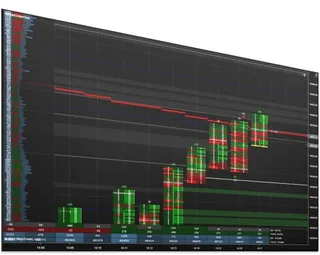
Impact Order Flow Indicator
Bid/ask, volume, delta, imbalances, and block trades in one customizable view

Impact Order Flow Entry Orders
The complete Impact order-flow trading package
About Order Flow
Order flow tools read the market tick by tick to show where buying and selling pressure is actually trading, not just where price closed. On NinjaTrader 8 that means volume data at each price: who traded at the bid and the ask, imbalances, block trades and exhaustion.
The Impact Order Flow Indicator is our full order flow study. Order Flow Entry Orders is an Enhanced Chart Trader module that works with NinjaTrader's standard Volumetric bars to trigger orders on stacked imbalances, block trades or washout signals. Impact Order Flow Entry Orders is the complete package.
Order flow is most useful in liquid futures markets where all volume trades on one exchange, such as the E-mini and Micro index futures, crude oil and gold. It needs tick level data from your data feed, which NinjaTrader receives from your broker or data provider.
Common questions
What is a stacked imbalance?
An imbalance is a price where one side traded much more volume than the other side at the neighboring price. Several imbalances in a row on the same side are called stacked, and traders read them as strong one-sided pressure.
Do I need Volumetric bars?
Order Flow Entry Orders works with NinjaTrader's standard Volumetric bars, so your NinjaTrader setup needs to be able to load them. Each product page lists its own requirements.
What is a block trade?
A single trade far larger than the usual trade size at that moment, often from a large participant. Order Flow Entry Orders can trigger an order when one prints.
How is order flow different from a regular chart?
A regular candle shows only open, high, low and close. Order flow shows how much traded at the bid and at the ask at each price inside the bar, so you can see who was in control while the bar formed.
Can I place orders from order flow signals?
Yes. Order Flow Entry Orders and Impact Order Flow Entry Orders turn order flow conditions into order entry from the chart, so you do not have to click at the exact moment a signal appears.
Is order flow a complete strategy on its own?
No. Order flow shows who is in control at each price; most traders combine it with key levels, trend or their own rules to decide where to trade.
How do I install it?
Like any NinjaTrader add-on: download it from NinjaScript Downloads in the Members Area, then in NinjaTrader choose Tools, Import, NinjaScript Add-On and select the file you downloaded.
Do I need NinjaTrader's Order Flow+?
Order Flow Entry Orders works with NinjaTrader's Volumetric bars, which are part of NinjaTrader's Order Flow+ feature set, so it needs Order Flow+. Check each product page for its own requirements.
How do I learn to read order flow?
Our tools show and act on order flow; they do not teach it. Practise on a simulation account or with NinjaTrader's Playback connection, watch how imbalances and absorption behave at your levels, and only then automate entries.
Why do historical bars sometimes look different from live ones?
Order flow history depends on the tick data your provider supplies for past sessions. If less history is loaded, older bars show less detail, so judge a setup on bars that formed while you were connected.
Which hours work best?
The most active hours of the market you trade, such as the regular US session for index futures. Order flow needs volume to read, so quiet overnight hours show far less.
Does order flow work on any chart type?
Order flow is read from the volume traded at each price, so it is most useful on time, tick or volume based charts where each bar covers a meaningful amount of trading.