
NinjaTrader Tools
Add-ons that upgrade NinjaTrader 8 itself rather than adding another indicator: chart themes and a heads-up display, a workspace organizer, a Ctrl+K command palette, and performance checks you run on your own PC.
NinjaTrader Tools products
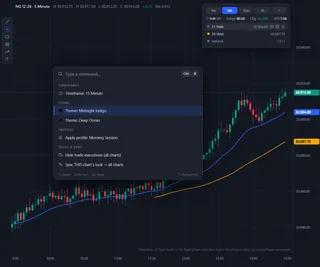
Chart Studio
A modern look and fewer clicks for NinjaTrader 8, with free chart cleanup and starter themes
About NinjaTrader Tools
NinjaTrader Tools are add-ons that improve NinjaTrader Desktop itself instead of drawing another study on your chart. This category holds Chart Studio, which puts color names back in every NinjaTrader 8 color setting and adds 15 chart themes, a heads-up display, a Ctrl+K command palette, a workspace organizer and one-step sync of your chart settings to all your charts.
Chart Studio also includes performance checks you run on your own PC, so you can see what is slowing NinjaTrader down. The performance checks are free; the chart and workspace features come with the paid license.
Most traders end up with charts that all look different, workspaces that are slow to find, and settings scattered across many windows. Tools in this category work on that layer: how NinjaTrader looks, how quickly you can find things, and how well it runs on your PC.
Common questions
Does Chart Studio change my indicators or strategies?
No. It works on how charts and workspaces look and are organized, not on trading logic, so your indicators, strategies and orders keep working as they do today.
Which NinjaTrader version does it need?
It is built for NinjaTrader Desktop (NinjaTrader 8) and runs inside it, like any other add-on.
What does one-step sync do?
It applies the look you set up on one chart to all your charts at once, instead of changing each chart by hand.
What is the Ctrl+K command palette?
A search box you open with Ctrl+K. Type what you want and pick it from the list, instead of hunting through menus and settings windows.
Where do I get help?
Live chat support on our website, the same as for every product here.
Why do color names matter?
NinjaTrader 8 shows its color settings as swatches, which makes it hard to match the same color across indicators and charts. Chart Studio shows the name of each color, so you can pick the same one everywhere.
What do the performance checks look at?
They run on your own PC and look for what is slowing NinjaTrader down, so you can fix it before a busy trading session instead of during one.
How do I install it?
Like any NinjaTrader add-on: download it from NinjaScript Downloads in the Members Area, then in NinjaTrader choose Tools, Import, NinjaScript Add-On and select the file you downloaded.
What usually slows NinjaTrader down?
Common causes are charts loading many days of tick data, indicators set to calculate on every tick when on bar close would do, several workspaces open at once (every open workspace keeps running), and Windows syncing the Documents folder NinjaTrader writes to through OneDrive. Our article on NinjaTrader and OneDrive explains the last one.
Will a tool like this make my charts look the same everywhere?
That is what the theme and sync features are for: set the look once and apply it to every chart, instead of changing colors, fonts and backgrounds window by window.
How do I check whether my PC is the problem?
Close every workspace you do not need, reopen NinjaTrader, and watch how it behaves with a single chart. If it is smooth, add charts and indicators back one at a time; the step that makes it slow again is usually the cause.
Does Chart Studio run on NinjaTrader Web or NinjaTrader Mobile?
No. Only NinjaTrader Desktop runs add-ons, so Chart Studio works on NinjaTrader Desktop on a Windows PC.
What else helps NinjaTrader run well?
Keep NinjaTrader and its Documents folder on a fast local drive rather than a synced cloud folder, and close programs you do not need while you trade.