
Chart Studio
Color names, chart themes, dark mode and a workspace organizer for NinjaTrader 8
Put color names back in every NinjaTrader 8 color setting and make every chart look and work the way you want: 23 chart themes, a heads-up display, a Ctrl+K command palette, a workspace organizer and one-step sync to all your charts. Hiding chart labels, four themes and the performance tools that tune NinjaTrader are free.
Free for good: hide chart labels, plus four built-in themes. Your first 7 days include everything.
Create your free accountSee what's free and what's paid in all our tools
Overview
Chart Studio upgrades NinjaTrader 8 itself, not your strategy. It changes how your charts look, how quickly you get around your workspaces, and how much you can see about what NinjaTrader is doing on your PC.
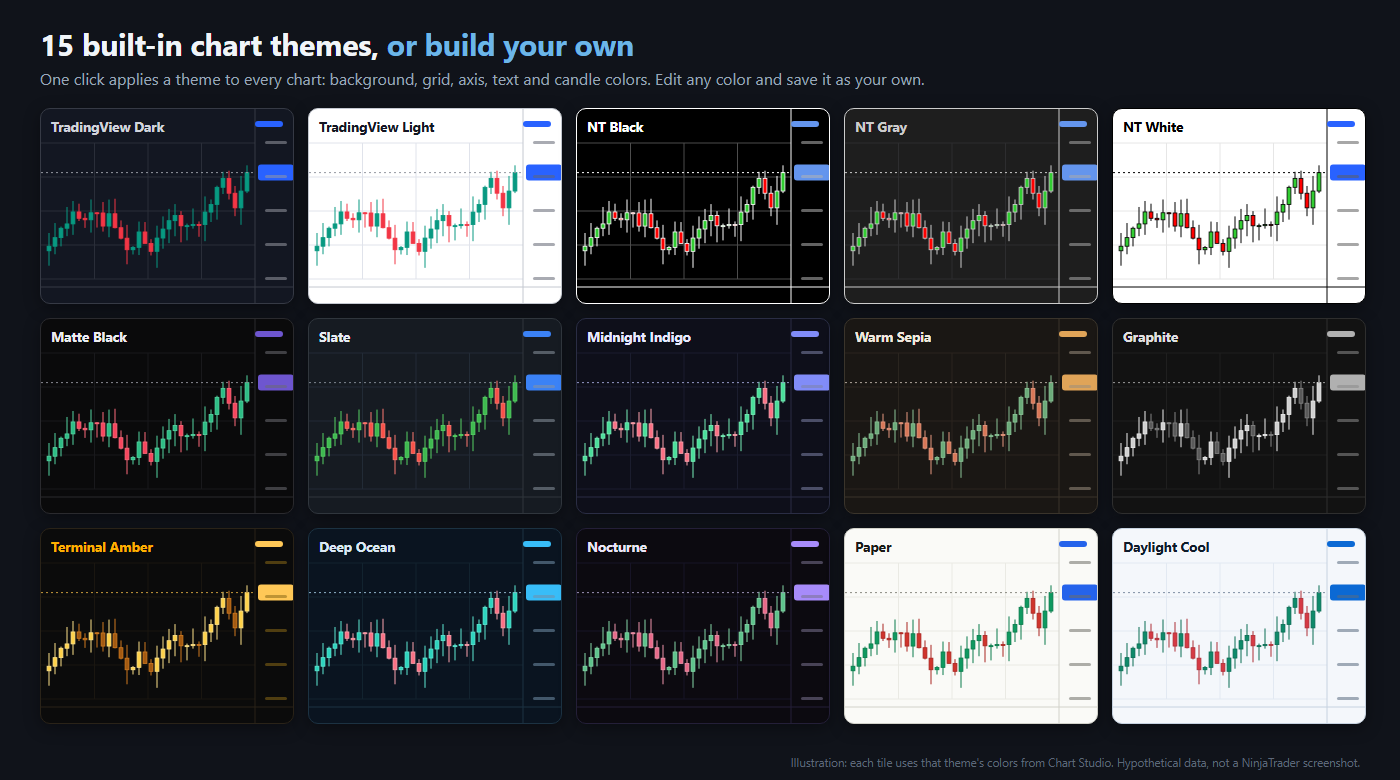
Every chart, one clean look. Pick one of 23 built-in themes, from TradingView-style Dark and Light to NinjaTrader’s own Black, Gray and White, or edit any color and save your own. Set your candle colors, gridlines, right margin and one font for axis text, then copy the whole look to your other charts in one step, with Undo.
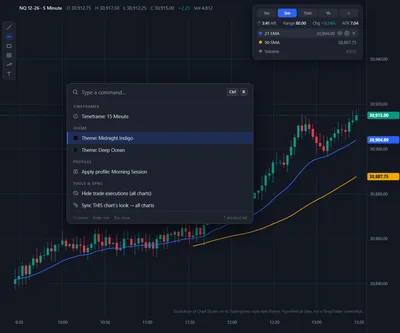
Fewer clicks all day. A floating HUD holds your indicator legend, a timeframe switcher, the bar countdown and the day’s range. Ctrl+K opens a command palette that switches timeframe, instrument, theme or profile without opening a menu. The Workspace Switcher opens or switches workspaces from one window, and Chart Finder jumps straight to any loaded chart.
A smoother NinjaTrader, free. The Performance tab is yours for good with a free account on one PC. Choose how often NinjaTrader redraws your charts, switch its built-in indicators to update once per bar instead of on every price change, and let Chart Studio pause its own extras on charts you cannot see. Charts no longer blink when you drag one and let go. Then measure the result on your own PC with a responsiveness check, a processing lag monitor and a memory monitor.
Free for good on one PC with a free Affordable Indicators account: hide the indicator labels in the top-left corner of every chart, use four of the built-in themes, and run the performance checks (a responsiveness check, a processing lag monitor, a memory monitor and more). The full set of 23 themes, theme editing and everything else in Chart Studio come with a 7-day trial, no card needed.
📦 What's Included
Refund and Sales Policy
30-day money-back guarantee. If this product does not work as advertised, report it within 30 days of your purchase and give us 14 days to resolve the issue. If we cannot, you get a full refund. The guarantee covers the purchase price only, never trading results or losses on any account. Read the full terms.
Product licenses can only be used on the purchaser's computer(s). All purchases include a lifetime license with free future updates.
Chart Studio Features & Benefits
Color names are back
NinjaTrader 8.1.7 shows colors as codes like #FFDAA520 instead of names like Goldenrod. Chart Studio puts the names back on every color setting, in every indicator and strategy, NinjaTrader's own and third-party ones too, with a list of named colors and a full picker: spectrum, palette, recent colors, name search, RGBA sliders and hex entry.
23 chart themes, or your own
TradingView-style Dark and Light, NinjaTrader Black, Gray and White, Paper, Terminal Amber, Deep Ocean and more. Apply one across your charts, start from four quick looks, edit any color and save your own, and set your own up and down candle body, outline and wick colors.
One look on every chart
Set gridlines, the watermark, one right margin and one font and size for axis text, then copy this chart's look to your other charts, all of them or only the ones you choose. Copy one chart's bar width and spacing to all charts too. Undo reverses the latest sync. Sync skips Accounts Dashboard and Enhanced Chart Trader tabs.
Heads-up display
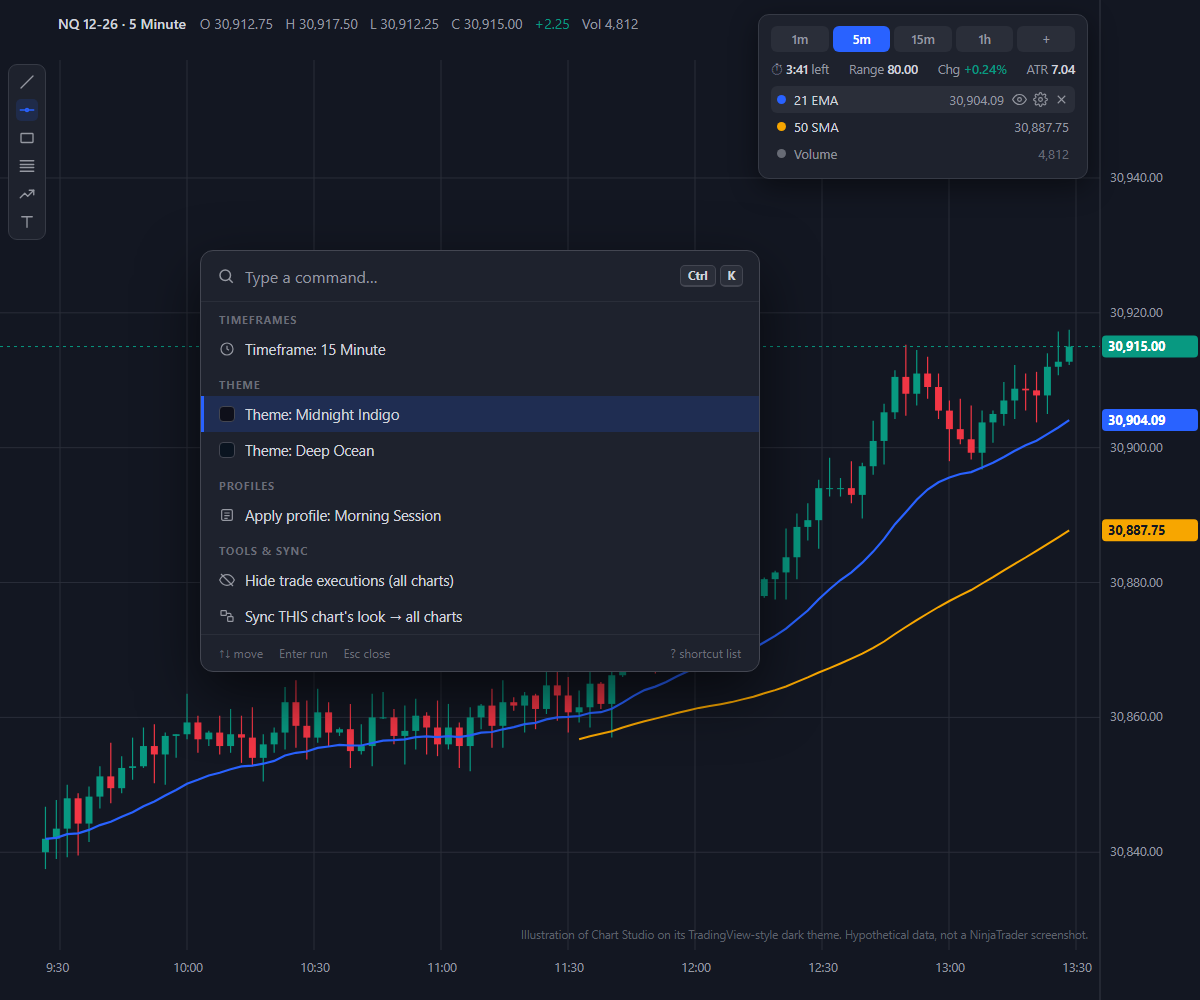
A floating HUD that can fold into a small pill until you hover over it. Show, hide, edit or remove any indicator from its legend, switch timeframe, and see the bar countdown, ticks or volume remaining, and the day's range, change and ATR. Step through loaded history 24 hours at a time, or jump to the oldest loaded bar or the latest one.
Ctrl+K command palette
Press Ctrl+K on a chart and type. Switch timeframe, instrument, theme or profile, show or hide an indicator, auto-scale, or hide trade executions on every chart, without opening a menu. Press ? for the shortcut list.
Workspace Switcher and Chart Finder
See all your workspaces in one window and open, switch to or close one, with favorites. Chart Finder lists your loaded charts, filters them by workspace or instrument and jumps straight to the one you want.
Profiles for every setup
Save a complete look, from theme and fonts to the HUD, toolbars and timeframes, as a profile. Switch profiles from Ctrl+K, import and export them, and restore any of your last 24 saved versions.
More chart control
Hide the NinjaTrader toolbar buttons you never use, hide execution markers and trade lines, keep a fixed vertical price range that follows price, and double-click empty chart space to auto-scale.
Price flags and drawing pins
Y-axis price flags for your indicators with their names beside them, and an OHLC readout that can follow your pointer. Pin the drawing tools you use to the top toolbar or a strip on the left edge.
Free: Hide chart labels
Hide the indicator labels in the top-left corner of your charts for free. Hiding the gridlines and the watermark, or shortening it (NQ 09-26 becomes NQ), is part of Chart Studio. Apply one of four built-in themes, with matching price bar colors. The other themes and theme editing are part of Chart Studio.
Free: Tune NinjaTrader
Pick NinjaTrader's chart refresh interval: a longer one saves CPU and graphics work on a busy PC, a shorter one looks smoother. Switch built-in indicators from On price change to On bar close, chart by chart, and restore the originals whenever you like. Let Chart Studio pause its own extras on hidden or minimized charts. Smooth Window Moves, on by default, stops a chart window blinking when you drag it and drop it. Optionally give NinjaTrader above-normal CPU priority in Windows. Then measure it: a responsiveness check against a baseline, the processing lag and memory monitors, workload counts, a 30-second timeline and chart loading checks. Diagnostics sends logs to our support only after you approve.
Included with your purchase
Lifetime Purchase
A one-time purchase with a lifetime license — no monthly or yearly fees. Buy once and it stays yours across every future version.
Free Updates
Free lifetime upgrades — every new feature and improvement is included at no extra cost, updated regularly from trader feedback.
Customer Support
Human live-chat support included with every license — real people who usually reply within minutes, before and after you buy.
No video for this one yet
We have been heads down building Chart Studio instead of filming it. Guilty.
If seeing it move would help you decide, just ask. Tell us what you want to see and we will bump it to the top of the recording list. We would rather make the video you actually need than guess.
In the meantime, we answer questions with real humans, usually within minutes. Ask us anything about Chart Studio and we will show you exactly how it works.
Plenty of walkthroughs are on the channel already. This one is just next in line.
Screenshots
Requirements & Setup
System Requirements
| Platform | NinjaTrader Desktop (NinjaTrader 8) on Windows |
| NinjaTrader versions | NinjaTrader 8.1.x.x (every 8.1 release, including the latest, 8.1.8.4) and NinjaTrader 8.0.28.0. On 8.0.28.0? After you buy, request the 8.0.28.0 build in your Members Area or ask us on live chat. |
| Account | Free Affordable Indicators account with a confirmed email |
| This PC | This PC's NinjaTrader machine ID added under NinjaTrader Machine IDs in your Members Area (NinjaTrader shows it under Help › About) |
| Free | Hide the top-left indicator labels, four built-in themes, and the performance checks: responsiveness check, processing lag and memory monitors, workload counts, performance timeline, saved workspace and chart loading checks, environment checks, chart refresh interval, Smooth Window Moves, less Chart Studio work on hidden charts, indicator update preparation, CPU priority option, Diagnostics. One PC. |
| Chart Studio | Color names on every color setting, 23 themes, candle colors, axis font, gridlines, toolbars, HUD, Ctrl+K command palette, Workspace Switcher, Chart Finder, profiles, sync, price flags, drawing pins. 7-day free trial, then a 1 PC or 2 PC license (on sale at release) |
| Install | Add it from Start Free in your Members Area, download it from NinjaScript Downloads, then in NinjaTrader choose Tools › Import › NinjaScript Add-On |
Installation
- Create a free Affordable Indicators account and confirm your email.
- Add this PC's NinjaTrader machine ID under NinjaTrader Machine IDs in your Members Area. In NinjaTrader, Help › About shows it.
- Download Chart Studio from Free Tools in your Members Area.
- In NinjaTrader, choose Tools › Import › NinjaScript Add-On and select the file you downloaded.
- Open it from Control Center › Tools › Affordable Indicators › Chart Studio. On the License page, enter your member email and choose Save email if it is not already filled in.
Good to Know
Which NinjaTrader version does this work with?
It is built for NinjaTrader Desktop (NinjaTrader 8) on Windows: every 8.1.x.x release, including the latest, 8.1.8.4, and NinjaTrader 8.0.28.0. On 8.0.28.0, request the 8.0.28.0 build in your Members Area or ask us on live chat after you buy. Like every NinjaTrader add-on, it does not run on NinjaTrader Web or the NinjaTrader mobile app.
Is this a one-time purchase or a subscription?
A one-time purchase. Every license includes a lifetime license with free future updates — no recurring fees.
Can I use it on more than one computer?
Yes — choose the 2 PC license option at checkout to run it on a second computer.
Do I get free updates?
Yes — free lifetime updates. New versions appear automatically in your Members Area.
What support is included?
Human chat support plus our active Discord community, backed by 18 years of NinjaTrader programming experience.
What is your refund policy?
This product is covered by our 30-day money-back guarantee. If it does not work as advertised, report it within 30 days of your purchase and give us 14 days to resolve the issue. If we cannot, you get a full refund. It covers the purchase price only, never trading results or losses on any account. See the full terms.
Frequently Asked Questions
How do I change the chart theme or get dark mode in NinjaTrader 8?
Chart Studio adds 23 built-in chart themes to NinjaTrader 8, including TradingView-style Dark and Light and NinjaTrader's own Black, Gray and White. Apply one across your charts, start from four quick looks, or edit any color and save your own theme. You can also set the up and down candle body, outline and wick colors, the gridlines and one font for axis text.
Why don't NinjaTrader 8's color settings show color names anymore?
Since NinjaTrader 8.1.7, its color editor shows a code such as #FFDAA520 instead of a name like Goldenrod, and the list of named colors is gone. Chart Studio puts the names back on every color setting, in every indicator and strategy (NinjaTrader's own and third-party ones too) and in the chart and Data Series properties. Pick from a named list with color squares, or open the full picker for a spectrum, palette, recent colors, a searchable list of names, RGBA sliders, hex entry and one-click transparent. It is part of Chart Studio and its 7-day free trial.
Is Chart Studio free?
Part of it is free for good on one PC with a free Affordable Indicators account: hiding chart labels, four built-in themes and the performance tools, which tune NinjaTrader and measure it. Everything else, including color names on every color setting, all 23 themes, theme editing, the heads-up display, the Ctrl+K command palette and the Workspace Switcher, is Chart Studio, which comes with a 7-day trial. Licenses go on sale when Chart Studio is released.
Can I hide the indicator labels, gridlines and watermark on NinjaTrader charts?
Yes, and it is part of the free version. Chart Studio can hide the indicator labels in the top-left corner of your charts, hide the gridlines, and hide the watermark or shorten it, so NQ 09-26 becomes NQ. You can also apply one of four built-in themes with matching price bar colors. The Enabled switch in the settings window takes it all off again.
How do I copy one chart's settings to all my NinjaTrader charts?
Use Sync in Chart Studio. It copies one chart's look, including the theme, gridlines, watermark, right margin and axis font, to all of your other charts or just the ones you choose. It can also copy one chart's bar width and spacing. Undo reverses the latest sync until you run another one or restart NinjaTrader. Sync skips Accounts Dashboard and Enhanced Chart Trader tabs.
How can I find out what is making NinjaTrader run slow?
Run Chart Studio's free performance checks. They let you run a responsiveness check against a baseline, watch chart and instrument queues with the processing lag monitor, sample NinjaTrader's memory every 5 minutes, count the series, bars and indicators on each chart, and record a 30-second timeline. The checks measure; they do not make NinjaTrader faster by themselves. Diagnostics sends logs to our support after you approve.
Will Chart Studio make NinjaTrader faster?
It can help, and the tools that help are free. A longer chart refresh interval and On bar close indicators ask NinjaTrader to do less work, and Smooth Window Moves stops the blink when you move a chart. We do not publish speed numbers, because the result depends on your PC, your charts and your indicators. The CPU priority option only changes how Windows schedules NinjaTrader; it does not make indicators or your broker faster, and other programs may get less time. The paid chart features draw on your charts, so they add some work, and the Enabled switch turns them all off. To see the difference on your own PC, run the responsiveness check, change one setting, and run it again.
How does the Chart Studio free trial work?
Once your email is confirmed and this PC's NinjaTrader Machine ID is on your account, opening the settings window or choosing Start free trial starts 7 days of everything in Chart Studio. There is no card, no checkout and no automatic charge, and there is one trial per account and one per PC. When it ends, the performance checks keep working and your saved looks stay saved.
How do I switch workspaces and charts faster in NinjaTrader 8?
Chart Studio's Workspace Switcher shows all your workspaces in one window, where you can open, switch to or close one and mark favorites. Chart Finder lists your loaded charts, filters them by workspace or instrument and jumps to the one you want. On a chart, Ctrl+K opens a command palette that switches timeframe, instrument, theme or profile without opening a menu.
Does Chart Studio change my NinjaTrader settings permanently?
Mostly not. The Enabled switch at the top of the settings window takes the Chart Studio look off your charts and sets chart colors back to your NinjaTrader skin. Two things change NinjaTrader's own settings and stay until you change them: Sync, which Undo reverses until your next sync or a restart, and indicator update preparation, which changes an indicator when you click Apply or OK.
Does it work with NinjaTrader 8.0.28.0?
Yes. It runs on every NinjaTrader 8.1.x.x release, including the latest, 8.1.8.4, and on NinjaTrader 8.0.28.0, the last 8.0 release. 8.0.28.0 takes its own build: after you buy, request it in your Members Area (NinjaScript Downloads, then NinjaTrader 8.0.28.0) or ask us on live chat and we will set you up.
You may also like



 Chart Studio