
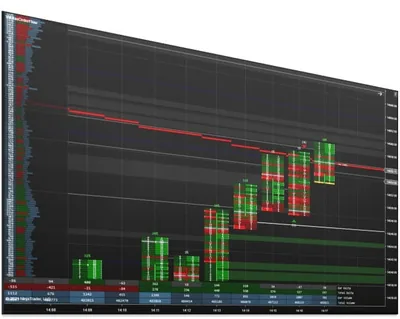
Impact Order Flow Indicator
A highly customizable NinjaTrader imbalance indicator for analyzing order flow with more clarity, speed, and flexibility.
Overview
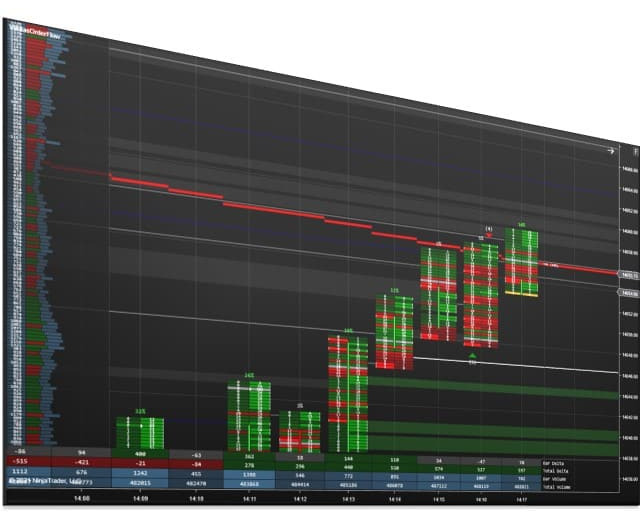
The Impact Order Flow Indicator is a highly customizable NinjaTrader imbalance indicator built to help experienced futures traders analyze order flow with more clarity, speed, and flexibility. It gives you a powerful way to view bid/ask activity, volume, delta, imbalances, block trades, unfinished auctions, and key daily reference levels in one streamlined setup.
Designed for NinjaTrader Desktop, it delivers an efficient, flexible order flow workspace that matches how you already read the market rather than forcing you into a fixed display.
Please only purchase this software if you are familiar with order flow. We do not teach order flow.
📦 What's Included
What Customers Are Saying
“I have traded futures for over 15 yrs and have used many different types of indicators and different forms of order flow setups. I can say with complete confidence that Affordable Indicators has far and away the best order flow indicator I have ever used.”
“I've been using the Order Flow software from Affordable Indicators for 2 years. I don't use it for its ability to enter orders for me. I use it to help me to find strength or weakness after a pullback. I trade the ES and one thing I've found most useful is to watch as buying or selling comes into the market.”
“I bought the impact order flow indicator 4 weeks ago. This indicator has improved my trading tremendously as it provides many different indicators and ways to enter the market on Ninja Trader. I also bought the duplicate account indicator which links all my accounts together. Now I can trade all my accounts at the same time.”
Refund and Sales Policy
30-day money-back guarantee. If this product does not work as advertised, report it within 30 days of your purchase and give us 14 days to resolve the issue. If we cannot, you get a full refund. The guarantee covers the purchase price only, never trading results or losses on any account. Read the full terms.
Product licenses can only be used on the purchaser's computer(s). All purchases include a lifetime license with free future updates.
Impact Order Flow Indicator Features & Benefits
Flexible Bar Display
Adjust Print Mode, Color Mode, Opacity Mode, Body Mode, and Above Bar settings to build your preferred order flow layout.
Imbalance & Momentum Zones
Create zones from diagonal bid/ask imbalances and compare the current bar to the previous bar's formation.
Swing & Magnet Levels
Build trend-based support and resistance levels and identify where bid and ask volume are equal or nearly equal.
Washout & Unfinished Auctions
Detect diagonal imbalance conditions and locate price levels that include both buys and sells.
Block Trades
Reveal where larger quantities traded and how many contracts were involved.
Daily Reference Levels
Plot Daily High, Daily Low, VWAP, Point of Control, and Value Area High/Low by default.
User-Defined Thresholds
Tune the order flow levels and signals using your own threshold values to fit your workflow.
Included with your purchase
Lifetime Purchase
A one-time purchase with a lifetime license — no monthly or yearly fees. Buy once and it stays yours across every future version.
Free Updates
Free lifetime upgrades — every new feature and improvement is included at no extra cost, updated regularly from trader feedback.
Customer Support
Human live-chat support included with every license — real people who usually reply within minutes, before and after you buy.
No video for this one yet
We have been heads down building Impact Order Flow Indicator instead of filming it. Guilty.
If seeing it move would help you decide, just ask. Tell us what you want to see and we will bump it to the top of the recording list. We would rather make the video you actually need than guess.
In the meantime, we answer questions with real humans, usually within minutes. Ask us anything about Impact Order Flow Indicator and we will show you exactly how it works.
Plenty of walkthroughs are on the channel already. This one is just next in line.
Reviews
Every review here is a genuine customer review from Trustpilot, Google and our YouTube community — never fabricated. YouTube has no star ratings, so the 2 YouTube comments show without stars and are not counted in the rating.
Leave a review →have had this for a year and the orderflow and support and resistance are top notch also great customer service joel personally took care of some issues and gave me a good price i personally got everything they had to offer
Have traded for number of years using many different indicators including Order Flow. Affordable Indicators far and away has the best OF indicator I have ever used. How good is it? Bottom line, I do not trade without it. On top of that, their support is first class; always have been quick to answer any questions I had.
I have traded futures for over 15 yrs and have used many different types of indicators and different forms of order flow setups. I can say with complete confidence that Affordable Indicators has far and away the best order flow indicator I have ever used. The functionality of it is amazing in terms of the different ways one can set it up. It automatically draws support and resistance levels. In the past I used to look at multiple charts and indicators. Now this order flow is my main chart that I concentrate on over 90% of the time.
I also use their trade copier which works great and never had a problem with it. And here is what is so important when we are purchasing something from a company... WHAT KIND OF SUPPORT DO THEY HAVE? Again Affordable Indicators has provided me with the best support I have ever experienced; they have real people who have contacted with me and most importantly; they have come into my computer a few times to help answer some of my questions. Bottom line... they are the BEST!!!
I have been using the Professional Chart Trader tools, including the Duplicate Account Actions, Risk Manager, and Impact Order Flow Indicator, and I must say they are the best on the market. The moment you start using Joel's tools, you can appreciate the time and effort spent creating these high-quality indicators and execution tools. I've tried other indicators from different brands, but AI's offerings stand out as the best by far.
Having them on my charts makes me feel like a professional trader. The tools are incredibly smooth, visually appealing, and functionally amazing. Using the Order Flow Indicator, I have developed a strategy that I am very grateful for. The support provided is also incredible.
Thank you, AI, for delivering such powerful, high-quality products to the market.
I bought the impact order flow indicator 4 weeks ago. This indicator has improved my trading tremendously as it provides many different indicators and ways to enter the market on Ninja Trader. I also bought the duplicate account indicator which links all my accounts together. Now I can trade all my accounts at the same time. This software was a game changer for me. I recommend it.
I am satisfied with the products I bought,
(Support and Resistance Suite and also Impact Order Flow Complete System)
they give me the ability to analyze the market effectively.
this are a tools that every trader must have.
Been using this indicator for 5 years, I cannot trade without it, period. Thanks Joel.
I have used his Orderflow indicator for years now. He is very willing to work with you and also help get your idea coded. He is also always coming up with new ideas which has improved my trading. I look forward to his new products.
My challenge has been understanding and viewing Order Flow. I like to look inside the bar to ascertain traders' sentiment. I day trade and I find that order flow sentiment allows me to trade effectively in the direction of the traders understood value at price levels.
Impact Order Flow Complete System allows me to "look inside the bars" for action and find imbalances which provide me with a visual cue as to trade direction of sentiment. You can add to that viewing block trades, market depth and more. TTP Order flow is rich in features and a powerful tool for the day trader. Think of this a Order Flow on steroids.
I find this an invaluable tool that I use every day as a primary guide for my trading.
I've been using the Order Flow software from Affordable Indicators for 2 years. I don't use it for its ability to enter orders for me. I use it to help me to find strength or weakness after a pullback. I trade the ES and one thing I've found most useful is to watch as buying or selling comes into the market. But the biggest thing is the order entry system.
It is so easy to use that I use it for placing orders. I'm a scalper and I'm normally looking for 4 or 5 ticks, but if the market starts to move quickly, I can easily drag my limit farther out and catch a few more ticks. Anybody that trades for a living knows we fight for every tick. This software is not a silver bullet but it is an effective tool in extracting ticks out of the market every day.
Order Flow X ft. Price Action - Perfect Combination
No reviews at this rating yet.
Customer satisfaction is our highest priority. We use Trustpilot and Google Reviews for full transparency.
Screenshots

Requirements & Setup
System Requirements
| Platform | NinjaTrader Desktop (NinjaTrader 8) |
| NinjaTrader versions | NinjaTrader 8.1.x.x (every 8.1 release, including the latest, 8.1.8.4) and NinjaTrader 8.0.28.0. On 8.0.28.0? After you buy, request the 8.0.28.0 build in your Members Area or ask us on live chat. |
| License | Lifetime — 1 PC or 2 PC options available |
| Support | Human chat support included with every license |
| Updates | Free lifetime upgrades — updated regularly based on trader feedback |
Installation
After purchase, your download is available instantly in your Members Area. Import the file into NinjaTrader Desktop, then follow the included step-by-step user manual and video guide. Need help? Use our human chat support or join the Discord community.
Good to Know
Which NinjaTrader version does this work with?
It is built for NinjaTrader Desktop (NinjaTrader 8) on Windows: every 8.1.x.x release, including the latest, 8.1.8.4, and NinjaTrader 8.0.28.0. On 8.0.28.0, request the 8.0.28.0 build in your Members Area or ask us on live chat after you buy. Like every NinjaTrader add-on, it does not run on NinjaTrader Web or the NinjaTrader mobile app.
Is this a one-time purchase or a subscription?
A one-time purchase. Every license includes a lifetime license with free future updates — no recurring fees.
Can I use it on more than one computer?
Yes — choose the 2 PC license option at checkout to run it on a second computer.
Do I get free updates?
Yes — free lifetime updates. New versions appear automatically in your Members Area.
What support is included?
Human chat support plus our active Discord community, backed by 18 years of NinjaTrader programming experience.
What is your refund policy?
This product is covered by our 30-day money-back guarantee. If it does not work as advertised, report it within 30 days of your purchase and give us 14 days to resolve the issue. If we cannot, you get a full refund. It covers the purchase price only, never trading results or losses on any account. See the full terms.
Frequently Asked Questions
What is the Impact Order Flow Indicator for NinjaTrader 8?
The Impact Order Flow Indicator is a NinjaTrader order flow indicator that runs on NinjaTrader Desktop (NinjaTrader 8). It shows bid and ask activity, volume, delta, diagonal imbalances, block trades and unfinished auctions on your chart, along with daily reference levels such as VWAP, Point of Control and Value Area High and Low. Bar display and signal thresholds are adjustable, so you can build an order flow layout that matches how you already read the market.
How does the Impact Order Flow imbalance indicator find order flow imbalances in NinjaTrader?
Zone Imbalance Levels compare bid and ask volume at diagonal price levels and create a zone where one side outweighs the other by a multiplier you set. Washout Signals use the same diagonal imbalance test with their own adjustable multiplier. Zone Momentum Levels add zones based on how the current bar formed compared with the previous bar, so you can follow both imbalance and momentum on one chart.
Can the Impact Order Flow Indicator show bid and ask volume inside each bar like a NinjaTrader footprint chart?
Yes. Print Mode displays the bars as Bid / Ask, Volume or Delta, so you can read the trading activity inside each bar instead of only the candle. Color Mode colors bars by Delta or as candlesticks, Opacity Mode shades them by volume, Body Mode sets where the candle sits over the bid and ask data, and Above Bar can show Delta Percent or Delta Total.
Which daily levels does the Impact Order Flow Indicator plot?
By default it plots the Daily High, Daily Low, VWAP, Point of Control (POC), and Value Area High and Low at 68% and 95%. These levels reset each day and sit on the chart alongside the order flow data, so session context and volume-based reference prices stay in view without adding a separate VWAP indicator.
Does the Impact Order Flow Indicator detect block trades, washouts and unfinished auctions?
Yes. Block Trades marks the price levels where large quantities traded and shows how many contracts were involved. Washout Signals flag diagonal imbalance conditions, Unfinished Auctions locate price levels that include both buys and sells, Magnet Levels mark prices where bid and ask volume are equal or nearly equal, and Swing Levels build trend-based support and resistance. Each one uses threshold values you can tune.
Can the Impact Order Flow Indicator place trades automatically?
No. The indicator is for analysis and does not place orders. If you want entries from its signals, Impact Order Flow Entry Orders bundles this indicator with Order Flow Entry Orders, Close Bar Entry Orders and Basic Chart Trader Tools. That package places semi-automated entries from stacked imbalances, block trades and washout signals directly from your NinjaTrader chart.
Do I need order flow experience to use the Impact Order Flow Indicator?
Yes. It is built for traders who already read order flow. The indicator gives you visualization and analysis tools for imbalances, delta, block trades and unfinished auctions, but it does not teach order flow concepts from scratch. If you are new to order flow, learn the basics first so the levels and signals make sense when they appear on your chart.
Does it work with NinjaTrader 8.0.28.0?
Yes. It runs on every NinjaTrader 8.1.x.x release, including the latest, 8.1.8.4, and on NinjaTrader 8.0.28.0, the last 8.0 release. 8.0.28.0 takes its own build: after you buy, request it in your Members Area (NinjaScript Downloads, then NinjaTrader 8.0.28.0) or ask us on live chat and we will set you up.
You may also like


 Impact Order Flow Indicator