

AI Trading System Builder
Build entry signals and exits with AI, then arm them with one click
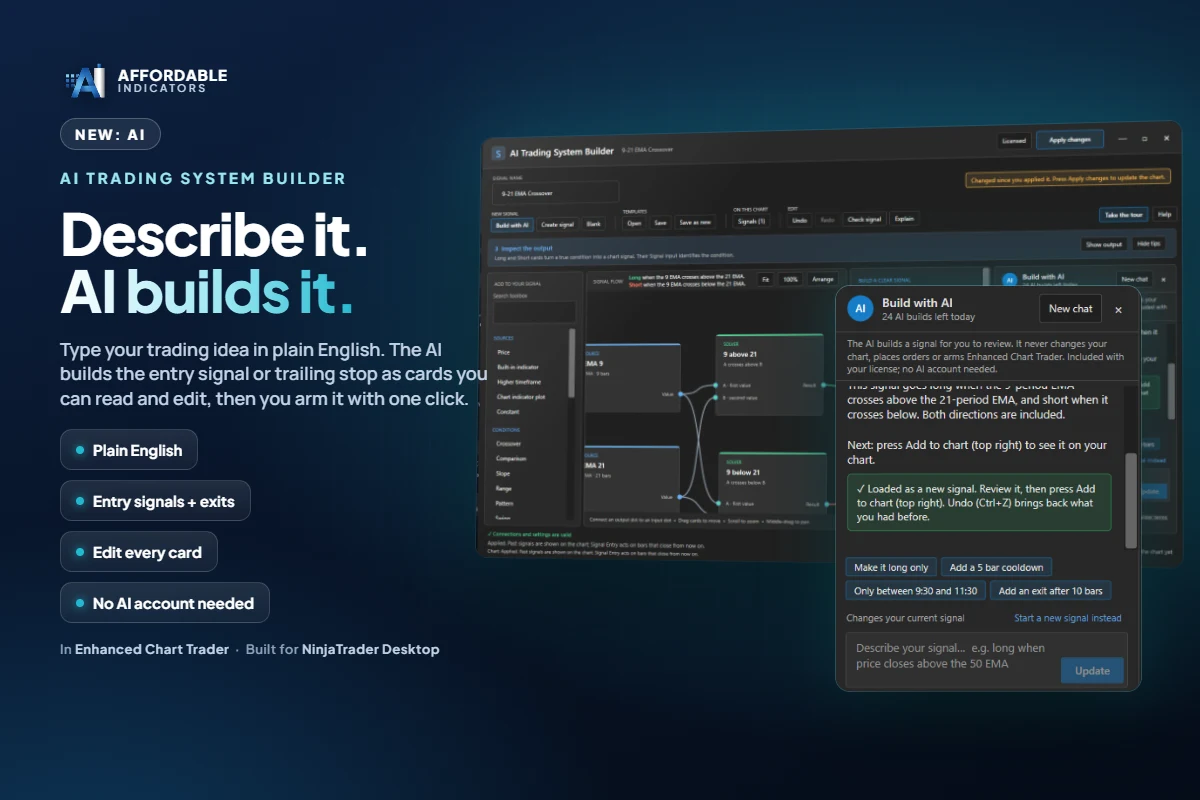
Describe your trading system, entries and exits, in plain English. AI Trading System Builder builds it, shows you where it fired on your chart, and trades only when you arm it with one click in Enhanced Chart Trader. Previously called Signal Entry Orders.
Overview
What’s new
Signal Entry Orders is now the AI Trading System Builder. Same Enhanced Chart Trader add-on, rebuilt so you can build your own trading system in plain English.
- Describe it, and AI builds it. Type your entries and exits the way you would explain them to a friend. The built-in AI lays them out as cards you can review, change and apply. No AI account or API key.
- Exits that manage the trade. Exit long, exit short, breakeven and exit-after-bars cards close or protect the trade your signal opened, only while you switch that signal’s Exits on.
- Trailing stops built with AI. With Advanced Exit Orders Management, describe how your stop should follow price, for example the bar’s low for longs and its high for shorts. It only ever tightens your stop.
- Higher timeframes, Fix it for me and Explain. Use a higher timeframe in your conditions, repair what Check signal finds as a draft you can undo, and read what your signal does in plain words.
- Several signals on one chart. Keep the signals you built in one list, pick which one Signal Entry trades, and rename or remove the rest.
- Easier to start. One-click starter examples, a short tour the first time you open it, and a License window that says exactly what your license covers and checks again with Refresh status.
Black Friday price: 1 PC $395 instead of $795 (50% off), or 2 PC $635.
AI Trading System Builder, previously called Signal Entry Orders, turns the setup in your head into a signal NinjaTrader 8 can trade. Type what you want, for example “go long when the 9 EMA crosses above the 21 EMA and RSI is under 70, only 9:30 to 11:00”, and the built-in AI lays it out as a signal for you to review. The AI is built in, so you don’t need an AI account or an API key.
See it before you trade it. Apply the signal and its arrows appear on the bars already on your chart, so you can see where it would have fired. These arrows are drawings on past bars, not trades or results; see our Disclaimer. Prefer to build by hand? The visual builder wires price, indicators, a higher timeframe, conditions and filters together, and ten starter templates give you a working signal on the first click.
Your exits, too. Add exit long, exit short, breakeven and exit-after-bars cards, or describe your exits in plain English, and the signal can manage the trade it opened. Exits act only while you switch on that signal’s Exits. With Advanced Exit Orders Management you can also add a trailing stop card, or build a trailing stop on its own, for example one that follows the bar’s low for longs and its high for shorts. Breakeven and trailing stops only ever tighten your stop.
You decide when it trades. An applied signal becomes the source for Signal Entry on Enhanced Chart Trader. Nothing is sent to your broker until you click Signal to arm it, and you can click again to stop. Entries use the Account, Quantity and ATM Strategy already set on your panel.
Everything Signal Entry Orders did, still here. Signal Entry still reads any indicator plot on your chart, BloodHound and our own signal indicators, with the same bar-close and time-filter controls. If you already own Signal Entry Orders or Professional Chart Trader Tools, AI Trading System Builder is already yours: update Enhanced Chart Trader. In Enhanced Chart Trader the window is titled AI Trading System Builder, and your signals are listed under AI System Builder in the Signal type list.
Help is built in too. Check signal lists anything that will not work, and Fix it for me repairs it as a draft you can undo. Explain tells you in plain words what your signal does. A short tour shows you around the first time, and Send to our team puts your question and your system in front of us.
📦 What's Included
What Customers Are Saying
“I have been using "Enhanced Chart Trader" and its various modules since 2022. I use it to easily and quickly place accurate orders, mostly when I'm trading ES and NQ. Use it each and every day, for all my orders. With a past as a software developer, I understand the value of a well-coded piece of software.”
“I wanted to create an the function of being able to enter a trade or get an alert signal when the stochastic indicator was in extreme overbought or oversold conditions, and Joel was able to customize the Enhanced Chart trader within a week.”
“I changed my grade to 5 stars because: (1) the company, in particular Joel, has gone all out to help me address the technical issue with the Enhanced trader indicator. (2) Joel has promised me to help with the Signals issue; it could be me or my computer capacity, too.”
Refund and Sales Policy
30-day money-back guarantee. If this product does not work as advertised, report it within 30 days of your purchase and give us 14 days to resolve the issue. If we cannot, you get a full refund. The guarantee covers the purchase price only, never trading results or losses on any account. Read the full terms.
Product licenses can only be used on the purchaser's computer(s). All purchases include a lifetime license with free future updates.
AI Trading System Builder Features & Benefits
Describe It, AI Builds It
Describe a signal in plain English and get a draft to review, or start from one of eight one-click examples. The AI is built in: no AI account, no API key, no extra bill.
Visual Builder
Wire price, built-in indicators such as MACD, Bollinger, Stochastics and Donchian, any plot on your chart, a higher timeframe, crossovers, patterns, swings and filters together, with no code.
Ten Starter Templates
Start from an EMA 9/21 cross, RSI extremes, an ATR breakout, a Bollinger breakout, a swing pullback and more, then change them.
Exits And Breakeven
Exit long, exit short, breakeven and exit-after-bars cards let your signal manage the trade it opened. They act only while you switch that signal's Exits on.
Trailing Stops Built With AI
With Advanced Exit Orders Management, add a trailing stop card to a signal or build one on its own, such as the bar's low for longs and its high for shorts. It only ever tightens your stop.
Help While You Build
Fix it for me repairs what Check signal finds, as a draft you can undo. Explain describes your signal in plain words, and a short tour shows you around.
See Past Signals
Apply a signal and its arrows appear on the bars already loaded, so you see where it would have fired before you trade it. They are drawings on past bars, not trades or results.
Arm It With One Click
The applied signal becomes the Signal Entry source. Nothing trades until you click Signal; entries use your Account, Quantity and ATM Strategy.
Your Signals Stay Put
Keep several signals on one chart and pick which one Signal Entry trades. They come back when you reload the chart or restart NinjaTrader. Exits start switched off again, so nothing acts until you turn them on.
Any Indicator Still Works
Signal Entry still trades any indicator plot, BloodHound or our signal indicators, on the bar close or intrabar.
Also Included: Basic Chart Trader ToolsView Product
Your AI Trading System Builder license also includes the complete Basic Chart Trader Tools:
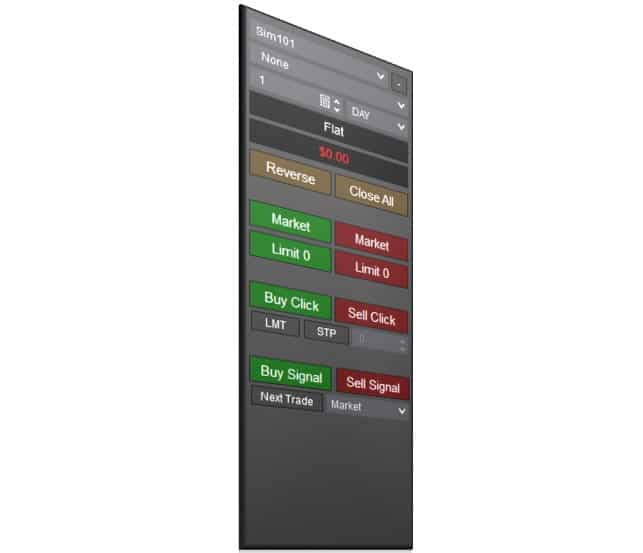
Click Entry Buttons
Click and drag orders onto your chart and switch between LMT, MIT, STP, and SLM orders with a customizable tick offset.
Limit Order Buttons
Create customizable limit or MIT entry buttons with adjustable tick offsets and a choice of Ask, Bid, Offer, or Spread.
Attach to Indicator
Attach a stop or target order to any NinjaTrader indicator in one click, with tick offsets and track or trail mode.
Micro/Mini Crossover
Keep your chart on the mini (like ES) and trade the micro (MES) instead — or the reverse — without switching charts or reloading the instrument.
Breakeven Button
Optionally add a breakeven button in the chart window with the entry line display or in the control panel area.
Profit & Loss Display
Show or hide P/L in ticks, points, or dollars, view daily P/L with or without commissions, and break it out per instrument.
Executions Display
Improves on the standard NinjaTrader display, showing details such as time in the trade and total profit in your chart window.
Trade Management
View contract size and distance to target/stop, track P/L, and drag, combine, or split stop and target orders with ease.
Additional Tools
Includes a universal bar counter, last price display, a reverse button, customizable panel colors, and bid/ask spread display.
Included with your purchase
Lifetime Purchase
A one-time purchase with a lifetime license — no monthly or yearly fees. Buy once and it stays yours across every future version.
Free Updates
Free lifetime upgrades — every new feature and improvement is included at no extra cost, updated regularly from trader feedback.
Customer Support
Human live-chat support included with every license — real people who usually reply within minutes, before and after you buy.
No video for this one yet
We have been heads down building AI Trading System Builder instead of filming it. Guilty.
If seeing it move would help you decide, just ask. Tell us what you want to see and we will bump it to the top of the recording list. We would rather make the video you actually need than guess.
In the meantime, we answer questions with real humans, usually within minutes. Ask us anything about AI Trading System Builder and we will show you exactly how it works.
Plenty of walkthroughs are on the channel already. This one is just next in line.
Reviews
Every review here is a genuine customer review from Trustpilot, Google and our YouTube community — never fabricated.
Leave a review →Good product and responsive customer support.
I changed my grade to 5 stars because: (1) the company, in particular Joel, has gone all out to help me address the technical issue with the Enhanced trader indicator. (2) Joel has promised me to help with the Signals issue; it could be me or my computer capacity, too. My apology to Joel and his team for the earlier bad review, You're a Michelin star now!
I have been using "Enhanced Chart Trader" and its various modules since 2022. I use it to easily and quickly place accurate orders, mostly when I'm trading ES and NQ. Use it each and every day, for all my orders.
With a past as a software developer, I understand the value of a well-coded piece of software. Today I can't imagine a trading life without "Enhanced Chart Trader".
//Brp
I wanted to create an the function of being able to enter a trade or get an alert signal when the stochastic indicator was in extreme overbought or oversold conditions, and Joel was able to customize the Enhanced Chart trader within a week.
No reviews at this rating yet.
Customer satisfaction is our highest priority. We use Trustpilot and Google Reviews for full transparency.
Screenshots

Requirements & Setup
System Requirements
| Platform | NinjaTrader Desktop (NinjaTrader 8) |
| NinjaTrader versions | NinjaTrader 8.1.x.x (every 8.1 release, including the latest, 8.1.9.1) and NinjaTrader 8.0.28.0. On 8.0.28.0? After you buy, request the 8.0.28.0 build in your Members Area or ask us on live chat. |
| License | Lifetime — 1 PC or 2 PC options available |
| Support | Human chat support included with every license |
| Updates | Free lifetime upgrades — updated regularly based on trader feedback |
Installation
After purchase, your download is available instantly in your Members Area. Import the file into NinjaTrader Desktop, then follow the included step-by-step user manual and video guide. Need help? Use our human chat support or join the Discord community.
Good to Know
Which NinjaTrader version does this work with?
It is built for NinjaTrader Desktop (NinjaTrader 8) on Windows: every 8.1.x.x release, including the latest, 8.1.9.1, and NinjaTrader 8.0.28.0. On 8.0.28.0, request the 8.0.28.0 build in your Members Area or ask us on live chat after you buy. Like every NinjaTrader add-on, it does not run on NinjaTrader Web or the NinjaTrader mobile app.
Is this a one-time purchase or a subscription?
A one-time purchase. Every license includes a lifetime license with free future updates — no recurring fees.
Can I use it on more than one computer?
Yes — choose the 2 PC license option at checkout to run it on a second computer.
Do I get free updates?
Yes — free lifetime updates. New versions appear automatically in your Members Area.
What support is included?
Human chat support plus our active Discord community, backed by 18 years of NinjaTrader programming experience.
What is your refund policy?
This product is covered by our 30-day money-back guarantee. If it does not work as advertised, report it within 30 days of your purchase and give us 14 days to resolve the issue. If we cannot, you get a full refund. It covers the purchase price only, never trading results or losses on any account. See the full terms.
Frequently Asked Questions
Do I need my own AI account or API key?
No. The AI runs on our server and is included. You type the description inside NinjaTrader; there is nothing to sign up for or pay separately. Fair use is up to 25 AI builds per day per customer.
I already own Signal Entry Orders. Do I have to pay again?
No. AI Trading System Builder is the new name for Signal Entry Orders (and for Signal Studio), and owners of Signal Entry Orders or Professional Chart Trader Tools have it included. Update Enhanced Chart Trader to the current version, open Signal Entry and pick Build With AI from the Signal type list.
I just bought it. Why don't I see it yet?
Open the builder's License window and press Refresh status. It checks your license again without restarting NinjaTrader. The email shown there must be the one you ordered with. If the ✦ Build with AI button is not on your panel yet, press F5 on the chart once.
Will AI Trading System Builder tell me what to trade?
No. It builds the signal you describe and nothing else. It does not suggest setups, entries or markets.
Does it place trades on its own?
No. Applying a signal only shows its arrows. Entries are sent only after you click Signal on Enhanced Chart Trader to arm it, and they use the Account, Quantity and ATM Strategy on your panel. Click Signal again to stop. Exit, breakeven and trailing stop cards act only on a trade that signal opened, and only while you have its Exits switched on. A trailing stop you build on its own runs only after you pick it in the Trailing Stop Loss list and turn the trailing stop on.
Does AI Trading System Builder need Enhanced Chart Trader?
Yes. AI Trading System Builder runs inside Enhanced Chart Trader, and Basic Chart Trader Tools is included with your purchase.
Will AI Trading System Builder place my stop loss and profit target?
Your first stop and target come from your ATM strategy. A signal entry is handed to NinjaTrader's ATM engine, which places the stop and target defined in that ATM template. If the ATM Strategy dropdown is set to None, the entry goes to your broker with no stop or target attached. After that, the signal can manage the trade: exit cards close it on your conditions, and breakeven and trailing stop cards move your stop, only ever tightening it. They need a stop to move, so check that your ATM template defines one before you arm a signal.
Can it build my exits and trailing stops?
Yes. Add exit long, exit short, breakeven and exit-after-bars cards, or describe your exits in plain English. Trailing stops need Advanced Exit Orders Management. With it, you can add a trailing stop card to a signal, or build a trailing stop on its own from ✦ Build with AI in the Trailing Stop Loss list. Without it, the trailing stop card reads Needs Advanced Exit Orders Management, and the rest of your signal still works.
Can I still use my own indicators?
Yes. Signal Entry still reads any indicator and plot on the same chart, including BloodHound. For indicators that draw arrows, set the Buy and Sell Plot Trigger to Any Value: it fires when a new arrow, triangle or dot appears on the bar that just closed. Plot Value, the default, fires when the plot equals the value you set, such as 1 or -1.
Does it work with NinjaTrader 8.0.28.0?
Yes. It runs on every NinjaTrader 8.1.x.x release, including the latest, 8.1.9.1, and on NinjaTrader 8.0.28.0, the last 8.0 release. 8.0.28.0 takes its own build: after you buy, request it in your Members Area (NinjaScript Downloads, then NinjaTrader 8.0.28.0) or ask us on live chat and we will set you up.
You may also like


 AI Trading System Builder