
Order Execution
We offer multiple NinjaTrader products to help improve trade placement and order execution.
Order Execution products

Basic Chart Trader Tools
The affordable way to replace and upgrade the standard NinjaTrader Chart Trader

Essential Chart Trader Tools
Smarter order entry, ATM strategy planning, and position sizing features
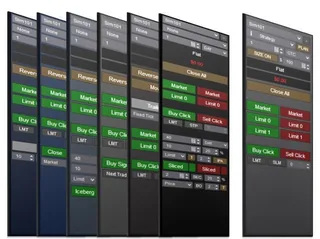
Professional Chart Trader Tools
Every Enhanced Chart Trader module, including the new AI Trading System Builder

Close Bar Entry Orders
One-click buttons that submit your entry the moment a bar closes

Advanced Exit Orders Management
Set stop loss & profit targets based on ATR, previous bar high/low, indicators or fixed tick amounts

Bracket Entry Orders
Bracket the market with a buy above and a sell below to catch fast moves

Price Based Entry Orders
One-click entries that trigger at the price levels you set

Order Flow Entry Orders
Semi-automated entries fired by stacked imbalances, blocks, and washouts

AI Trading System Builder
Describe a signal in plain English, see it on your chart, then arm it with one click in Enhanced Chart Trader

Iceberg Entry Orders
Work large size discreetly by splitting it into smaller disclosed orders

Time Sliced Entry Orders
Break a large order into smaller portions released at timed intervals
Limit If Touched Orders
Keeps a limit order hidden until price is touched, then submits it
About Order Execution
Order execution is everything between deciding to trade and having the position you meant to have: the order type, the price, the size and the stop and target that protect it. In fast futures markets the gap between the price you saw and the price you got (slippage) and orders entered late or at the wrong size cost more than most traders realise.
NinjaTrader Desktop already gives you market, limit and stop orders, ATM Strategies that attach a stop and target automatically, and the Chart Trader panel. The products on this page build on that. The Basic Chart Trader Tools replace the standard Chart Trader and are the foundation every module adds to. Essential and Professional Chart Trader Tools add one-click entry, automatic position sizing, risk/reward display and, in Professional, every module.
Each module solves one execution problem. Close Bar Entry Orders enters as the current bar closes. Signal Entry Orders enters when your indicator's signal confirms. Price Based Entry Orders trails an entry until it fills, which helps on Renko reversals and developing Range bars. Bracket Entry Orders places a buy above and a sell below as OCO orders for news moves. Iceberg and Time Sliced Entry Orders split a large order into smaller pieces. Limit If Touched holds a limit order on your computer until price touches it. Order Flow Entry Orders enters on Volumetric bar conditions, and Advanced Exit Orders Management sets stops and targets from ATR or bar highs and lows and trails them.
Common questions
Market or limit order?
A market order fills now at whatever price is available; a limit order fills only at your price or better, and may not fill at all. Use limits where missing the trade costs less than paying slippage, and markets (or stop-market exits) where getting out matters more than the price.
What is an OCO order?
One Cancels Other: two linked orders where a fill on one cancels the other. NinjaTrader uses it for a stop and a target, and Bracket Entry Orders uses it for entries on both sides of the market.
Where do I start?
Start with the problem you have most often. Entering late? Close Bar or Signal Entry Orders. Chasing price on Renko? Price Based Entry Orders. Every module includes the Basic Chart Trader Tools, so you can add others later.
Do these modules work with prop firm accounts?
They place ordinary NinjaTrader orders on whichever account is selected in the panel, so they work on any account NinjaTrader is connected to, including Rithmic and Tradovate prop firm accounts. Check your firm's own rules on automated or semi-automated entries.