
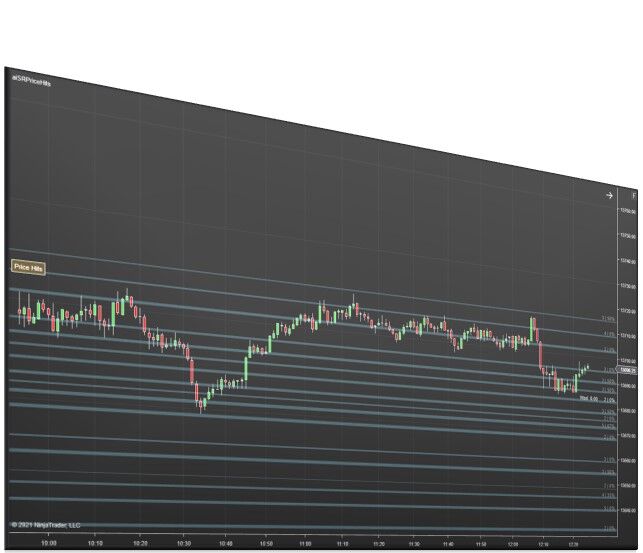
This NinjaTrader price action indicator combines highs, lows, body highs, and body lows across multiple time frames into support and resistance zones where price is most likely to react. Unlike static level tools, every zone is built from actual price interaction history: hit counts, time frame weighting, and last hit timestamps are all visible directly on the chart.
The indicator loads Daily and Weekly bars for building levels. You can customize up to three different data series of Minute Bars with the following settings:
- Bars Enabled – All, Swings
- Hits Enabled – Body, Wick, Both
- Days To Load – set number of days to load separately from how many days are loaded in the Chart window.
- Time Filter – choose to filter out data that isn’t relevant based on time of day.
Price Action Confluence Features and Benefits
Zones are color-coded by the highest time frame hit they contain: yellow for Weekly, red for Daily, blue for 240-minute, and so on down to 5-minute levels. Hit counts display on the right side of each zone, and hovering reveals a full breakdown by time frame plus the date, time, and bar type of the last hit.
Each of the three configurable Minute Bar data series has independent settings for what gets counted as a hit:
- Bars: All or Swings — include every bar’s high and low, or restrict to swing points only. For 5-minute data, Swings is recommended. For 240-minute data, All is reasonable.
- Hits: Wick, Body, or Both — choose what part of each bar counts. Higher time frames work well with Both; 5-minute data is cleaner with Wick only.
- Days to Load — set each series lookback independently from the chart window. Typical starting points: 7 days (5-min), 30 days (60-min), 90 days (240-min).
- Time Filter — restrict any series to a specific session window, such as 9:30am–4:00pm for 5-minute data while leaving higher time frames unfiltered.
Zone spacing, maximum zone height, and minimum hit thresholds are all adjustable to control how many zones appear. Because the indicator calculates on secondary data series, the zones are identical across any chart type: Renko, Range, or Minute.
How to Use the Price Action Confluence Indicator
The core decision when setting up this price action indicator for NinjaTrader 8 is how selective to be with each data series. A practical starting configuration:
- 5-minute: Swings, Wick only, 7 days, time filter on for regular session only
- 60-minute: Swings, Both, 30 days, no time filter
- 240-minute: All bars, Both, 90 days, no time filter
From there, use zone color and hit count to prioritize levels on the chart. A yellow or red zone with a high hit count is a high-priority area. A zone with only a handful of 5-minute hits is lower priority. If the chart becomes too dense, raise the minimum hits threshold or increase the minimum space between zones to reduce clutter.
Zones recalculate at the Globex session open and at any custom times you configure — many traders add an 8:00am recalculation before the regular session open.
Related NinjaTrader Indicators and Bundles
Support and Resistance Suite – Complete Zone and Signal Package
Price Action Confluence is included in the Support and Resistance Suite, which bundles all four core support, resistance, and signal tools at a discounted price:
- Price Action Confluence – zone building from historical price interaction across multiple time frames.
- Key Levels Confluence – combines OHLC, Fibonacci, pivots, whole numbers, and current-day levels into confluence zones.
- First Touch Signals – plots signals, targets, and stops based on moving average support and resistance.
- Ichimoku Cloud Signals – full five-plot Ichimoku Cloud indicator with configurable signal types.
The suite gives you both the zone context and the signal tools designed to work alongside it, at a better price than purchasing each separately.
Duplicate Account Actions – NinjaTrader Trade Copier
Duplicate Account Actions is the premier NinjaTrader trade copier, built to keep positions and orders synchronized across multiple accounts. For traders running a confluence-based strategy across multiple prop firm or live accounts, it removes the need to execute each account manually.
Key features include Executions Mode for instant order copying, ATM strategy assignment per follower account, Fade functionality, rejected order handling, and support for accounts on NinjaTrader, TradingView, Tradovate, and Rithmic.
Add Price Action Confluence to Your NinjaTrader 8 Charts
Price Action Confluence gives you zones built from what price has actually done — ranked by hit count, time frame significance, and recency. It is one of the most data-rich price action indicators for NinjaTrader 8 available, and it works across any chart type without reconfiguration.
Looking for more tools? Explore our full NinjaTrader software library.
Frequently Asked Questions
How is this different from a standard support and resistance indicator?
Most tools plot levels based on a formula. This one builds zones from actual price interaction history, tracking how many times price has touched each level, across which time frames, and how recently. That context helps you judge which zones actually matter versus which ones are just lines on a chart.
Do I need to manually update the zones throughout the trading day?
No. Zones recalculate automatically at the session open and at any custom times you configure. Once it is set up, the indicator manages itself.
Can I control how busy the chart looks?
Yes. You can adjust how many zones appear by filtering out lower-hit zones, increasing the space between zones, or turning off individual data series. It is designed to be as clean or as detailed as you want.
Does it work on any chart type?
Yes. The zones are the same whether you are on a Minute, Range, or Renko chart. Switching chart types does not affect the levels.
Is this included in any bundle?
Yes. Price Action Confluence is part of the Support and Resistance Suite, which includes three additional indicators at a discounted price. It is the most cost-effective way to get this tool alongside the signal indicators built to work with it.


