
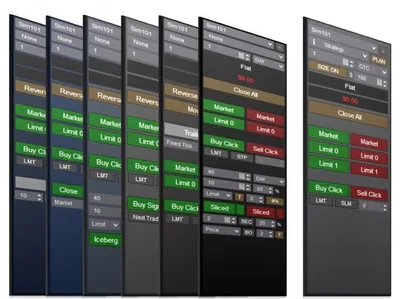
Professional Chart Trader Tools
The complete Enhanced Chart Trader bundle, including every module so you can build the perfect chart trader setup.
Overview
The Professional Chart Trader Tools includes every single feature and software product built into the Enhanced Chart Trader. It lets you add or remove modules and create the perfect chart trader setup.
Built on the Basic Chart Trader Tools foundation, the bundle gives you immediate access to the complete set of modules at a saving compared to purchasing them individually.
New features continue to be added across all Enhanced Chart Trader products based on feedback from customers who own the Professional Chart Trader Tools.
📦 What's Included
What Customers Are Saying
“After several years of active trading across TradeStation, NinjaTrader, and Thinkorswim with Schwab, we've tested a wide range of algorithms, strategies, indicators, and advanced scanning tools. While many of these gave us a meaningful edge, nothing has come close to Affordable Indicators' Professional Chart Trader.”
“BackGround I Trade NQ, ES RTY, YM, CL, GC, with 20 Years Experience & Profitable. I have used NinjaTrader 7 & 8, TradeStation, RealTick 3, Think or Swim (TD AmeriTrade), Meta Trader, Interactive Brokers, RobinHood & Rithmic NinjaTrade 8 is head and shoulders better than any other platform out there.”
“I have been using the Professional Chart Trader tools, including the Duplicate Account Actions, Risk Manager, and Impact Order Flow Indicator, and I must say they are the best on the market.”
Refund and Sales Policy
30-day money-back guarantee. If this product does not work as advertised, report it within 30 days of your purchase and give us 14 days to resolve the issue. If we cannot, you get a full refund. The guarantee covers the purchase price only, never trading results or losses on any account. Read the full terms.
Product licenses can only be used on the purchaser's computer(s). All purchases include a lifetime license with free future updates.
Professional Chart Trader Tools Features & Benefits
Essential Chart Trader
Adds position sizing, risk reward, one click entry, and other core trading features.
View ProductAdvanced Exit Orders
Boosts the ATM Strategy with initial exit options and trailing stops.
View ProductClose Bar Entry Orders
Submits your entry automatically the moment a bar closes — market, limit, stop, or stop-limit.
View ProductPrice Based Entry
Trailing stop and stop limit orders at the known close of various Renko bar types.
View ProductBracket Entry Orders
Long and short entry orders placed at the same time, immediately or on bar close.
View ProductIceberg Entry Orders
Conceals large entries into smaller order quantities, triggering based on fill events.
View ProductTime Sliced Entry
Conceals large entries into smaller order quantities, triggering based on a timer.
View ProductBasic Chart Trader Tools
The foundation every module builds on — order entry, trade management, breakeven, and P&L display.
View ProductIncluded with your purchase
Lifetime Purchase
A one-time purchase with a lifetime license — no monthly or yearly fees. Buy once and it stays yours across every future version.
Free Updates
Free lifetime upgrades — every new feature and improvement is included at no extra cost, updated regularly from trader feedback.
Customer Support
Human live-chat support included with every license — real people who usually reply within minutes, before and after you buy.
No video for this one yet
We have been heads down building Professional Chart Trader Tools instead of filming it. Guilty.
If seeing it move would help you decide, just ask. Tell us what you want to see and we will bump it to the top of the recording list. We would rather make the video you actually need than guess.
In the meantime, we answer questions with real humans, usually within minutes. Ask us anything about Professional Chart Trader Tools and we will show you exactly how it works.
Plenty of walkthroughs are on the channel already. This one is just next in line.
Reviews
Every review here is a genuine customer review from Trustpilot, Google and our YouTube community — never fabricated.
Leave a review →After several years of active trading across TradeStation, NinjaTrader, and Thinkorswim with Schwab, we've tested a wide range of algorithms, strategies, indicators, and advanced scanning tools. While many of these gave us a meaningful edge, nothing has come close to Affordable Indicators' Professional Chart Trader. It allows us to leverage the best of automated execution for entries and exits while keeping us fully in control of our trades on the NT8 desktop. The lower indicators complement price action directly on the chart, providing a clear visual edge that's hard to replicate. Out of everything we've used, Affordable Indicators delivers — by far — the strongest edge for trading active futures markets. A genuinely sound investment.
I use the Professional Chart Trader Tools, Duplicate Account Actions, and Account Risk Manager items. I wouldn't think of trading without these. I love the simplicity, functionality, and it helps my trading!!!
I have been using the Professional Chart Trader tools, including the Duplicate Account Actions, Risk Manager, and Impact Order Flow Indicator, and I must say they are the best on the market. The moment you start using Joel's tools, you can appreciate the time and effort spent creating these high-quality indicators and execution tools. I've tried other indicators from different brands, but AI's offerings stand out as the best by far.
Having them on my charts makes me feel like a professional trader. The tools are incredibly smooth, visually appealing, and functionally amazing. Using the Order Flow Indicator, I have developed a strategy that I am very grateful for. The support provided is also incredible.
Thank you, AI, for delivering such powerful, high-quality products to the market.
Having been Partner in charge of trading for a $6bil HF with over 40 years trading experience, I can honestly say that AI's Enhanced ChartTrader has made my trading more consistently profitable each and every day. The Trailing Stops module alone, will help you check your ego at the door and allow you to maximize your daily profits.
BackGround
I Trade NQ, ES RTY, YM, CL, GC, with 20 Years Experience & Profitable. I have used NinjaTrader 7 & 8, TradeStation, RealTick 3, Think or Swim (TD AmeriTrade), Meta Trader, Interactive Brokers, RobinHood & Rithmic
NinjaTrade 8 is head and shoulders better than any other platform out there. If you trade Options then Think or Swim is the best.
The new AI Chart Trader is a real game changer, having the ability to modify a resting order to your STOP Loss and Target is awesome.
I absolutely love the Affordable Indicators Enhanced Chart Trader product. I believe that trading without this product is a huge disadvantage to you as a trader. The one click entry, ability to bracket trades with 1-Click, money management functionality and overall simplicity makes it efficient and essential to every trader. Now that you can modify an existing NinjaTrader automated trade management order while the order is waiting to get filled is an absolute MUST to have while trading.
Markets move too fast and most order entry systems are too slow to allow a trader to react and get into the trades at the exact price desired. NinjaTrader 8 is the best platform out there for trading but without the Affordable Indicators Enhanced Chart trade product You will be left in the dust
The backend support I get from the guys at Affordable Indicators is top-notch, if I have any issues or problems with the software they are quickly to resolve them and deliver high quality of service. What’s more impressive is if I have suggestions to their product they are quick to implement and turn out a high-quality indicator
If you’re trading with market profile, volume profile, stochastics, candlesticks, MACD etc you’ll find their galleria products immensely complementary
Gator
No reviews at this rating yet.
Customer satisfaction is our highest priority. We use Trustpilot and Google Reviews for full transparency.
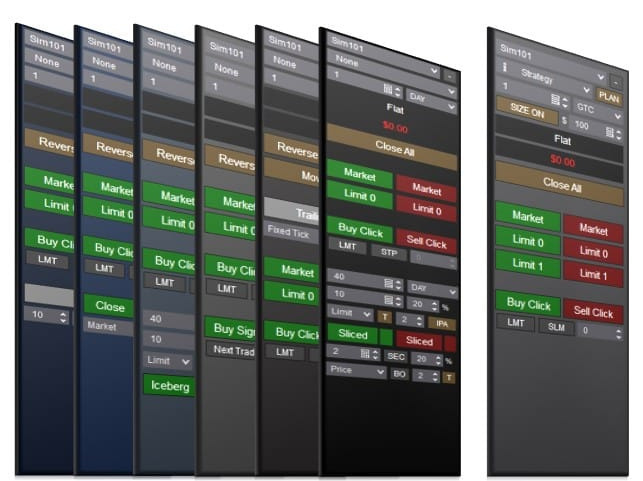
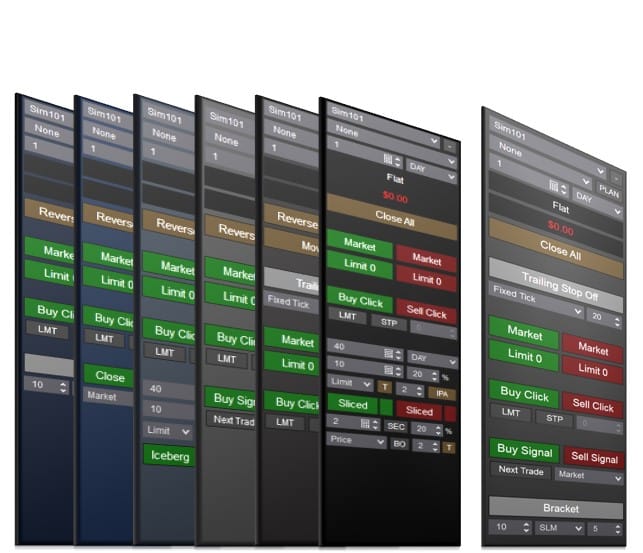
Screenshots
Setup
System Requirements
| Platform | NinjaTrader Desktop (NinjaTrader 8) |
| NinjaTrader versions | NinjaTrader 8.1.x.x (every 8.1 release, including the latest, 8.1.8.4) and NinjaTrader 8.0.28.0. On 8.0.28.0? After you buy, request the 8.0.28.0 build in your Members Area or ask us on live chat. |
| License | Lifetime — 1 PC or 2 PC options available |
| Support | Human chat support included with every license |
| Updates | Free lifetime upgrades — updated regularly based on trader feedback |
Installation
After purchase, your download is available instantly in your Members Area. Import the file into NinjaTrader Desktop, then follow the included step-by-step user manual and video guide. Need help? Use our human chat support or join the Discord community.
Good to Know
Which NinjaTrader version does this work with?
It is built for NinjaTrader Desktop (NinjaTrader 8) on Windows: every 8.1.x.x release, including the latest, 8.1.8.4, and NinjaTrader 8.0.28.0. On 8.0.28.0, request the 8.0.28.0 build in your Members Area or ask us on live chat after you buy. Like every NinjaTrader add-on, it does not run on NinjaTrader Web or the NinjaTrader mobile app.
Is this a one-time purchase or a subscription?
A one-time purchase. Every license includes a lifetime license with free future updates — no recurring fees.
Can I use it on more than one computer?
Yes — choose the 2 PC license option at checkout to run it on a second computer.
Do I get free updates?
Yes — free lifetime updates. New versions appear automatically in your Members Area.
What support is included?
Human chat support plus our active Discord community, backed by 18 years of NinjaTrader programming experience.
What is your refund policy?
This product is covered by our 30-day money-back guarantee. If it does not work as advertised, report it within 30 days of your purchase and give us 14 days to resolve the issue. If we cannot, you get a full refund. It covers the purchase price only, never trading results or losses on any account. See the full terms.
Release Notes
Enhanced Chart Trader is updated often. Brokers, prop firms and NinjaTrader versions keep changing how orders behave, and a chart trader has to stay safe through all of it.
Every fix reaches you as a free update. Here is what we have shipped recently.
-
October 18, 2026 Version 26.10.18.1 Latest
- NewSend diagnostics from the chat
- ImprovedMeet Ezra in Ask Joel
- ImprovedClearer license messages
- FixedSafer closing and adding
+ 2 more changes in the full release notes -
October 10, 2026 Version 26.10.10.1
- NewAsk Joel has its own window
- NewOne-click updates, start to finish
- NewSee which exits belong to which entry
- ImprovedBlock Opposite Direction Entries covers more
- FixedClose All catches partly filled orders
+ 6 more changes in the full release notes -
October 4, 2026 Version 26.10.4.1
- NewChoose which target closes first
- NewBlock accidental hedges
- NewLet your signals close the trade
- ImprovedClose All works like NinjaTrader’s Close
- ImprovedClose T1 that does what it says
+ 5 more changes in the full release notes -
September 25, 2026 Version 26.9.25.1
- NewSee which stop belongs to which target
- NewA one-click fix for delayed prices
- NewSignals from arrows and triangles
- ImprovedSafer ATM templates
- ImprovedRisk / Reward keeps your target where it belongs
+ 2 more changes in the full release notes -
September 22, 2026 Version 26.9.22.1
- NewArrange the order panel your way
- NewA compact view for more buttons
- NewTold when your broker stops responding
- ImprovedThe BE scroll wheel works the way it used to
- FixedClose All you can count on
+ 12 more changes in the full release notes -
September 15, 2026 Version 26.9.15.1
- NewSettings one click away
- NewFine-tune your breakeven distance
- NewHigh / Low targets that keep your ratio
- ImprovedSafer entries
- FixedLinked and OCO orders behave
+ 13 more changes in the full release notes
Show 18 earlier updates, back to July 16, 2021
-
August 19, 2026 Version 26.8.19.1
- FixedMinor fix related to ATM strategy
-
August 18, 2026 Version 26.8.18.1
- NewPrice flags on the price scale
- NewKnow when your broker is refusing orders
- FixedA smoother, more stable platform
- FixedBetter ATM strategy handling
+ 2 more changes in the full release notes -
August 9, 2026 Version 26.8.9.1
- NewAsk AI can now change your settings for you
- NewAsk AI changes colors by showing you colors
- NewYour color settings have names again
- FixedAsk AI fixes
- FixedDisplay and stability
-
August 6, 2026 Version 26.8.6.1
- NewDelayed and stale market data is now caught
- NewClosing from the chart is as fast as closing from the dashboard
- NewMore control over your executions display
- FixedATM exits and breakeven now cover the whole position
- FixedThe panel could vanish, or fail to come back
+ 4 more changes in the full release notes -
August 2, 2026 Version 26.8.2.1
- NewBreakeven moves any stop, and places one when you have none
- NewYour whole trading history, and one marker per trade
- NewHover a trade to see the fills behind it
- FixedFixes across the board
- FixedPerformance and display
-
July 30, 2026 Version 26.7.30.1
- NewMax Contracts
- NewEntries now join your running ATM
- NewSnap Distance is a real setting
- FixedOrder handling
- FixedStability
+ 3 more changes in the full release notes -
July 19, 2026 Version 26.7.19.1
- NewHot Keys, Rebuilt
- NewConflict & Collision Handling
- NewFour New Actions to Bind
- FixedHeld Hot Keys No Longer Repeat
- FixedPosition Sizing & Target Quantities
+ 5 more changes in the full release notes -
June 29, 2026 Version 26.6.29.1
- FixedBug Fixes & Stability
-
June 23, 2026 Version 26.6.23.1
- NewWhat’s New
- FixedPerformance & Stability
- FixedManage Custom Trailing Stops
- FixedOther Fixes
+ 1 more change in the full release notes -
June 16, 2026 Version 26.6.16.1
- NewClose-Confirmed Stop (Dual-Stop Wick Protection)
- NewMenu Position: Top / Bottom
- FixedOrder Execution & Sizing
- FixedHigh / Low Stop Preview
-
June 10, 2026 Version 26.6.10.1
- NewAsk AI, Right on Your Chart
- NewCustom Line Colors
- NewDisplay & Text Customization
- FixedDrag & Move Reliability
- FixedATM Plan Reliability
+ 1 more change in the full release notes -
June 2, 2026 Version 26.6.2.1
- NewCustom Trailing Stops Overhaul
- NewDedicated Properties Window
- NewATM Override Notice
- FixedSmoother Line Dragging
- FixedOrder Movement and Click Reliability
+ 1 more change in the full release notes -
May 29, 2026 Version 26.5.29.1
- NewGeneral Notes
- FixedStability & Polish
-
May 4, 2026 Version 26.5.4.1
- NewPanel You Can Actually Customize
- NewRight-Click to Trade
- NewHigh / Low Stops
- FixedRendering & Performance Overhaul
- FixedAdditional Fixes
+ 6 more changes in the full release notes -
December 16, 2025 Version 25.12.16.1
- NewCustomer Focused Improvements
-
January 31, 2025 Version 25.1.31.1
- NewRange & Renko Order Location
- FixedOnRender & OrderUpdates Improvements
-
January 20, 2025 Version 25.1.20.1
- NewComing Soon
-
July 16, 2021 Version 21.7.16.1
- NewInitial Release
Frequently Asked Questions
What is Professional Chart Trader Tools for NinjaTrader 8?
Professional Chart Trader Tools is the complete pro version of our Enhanced Chart Trader for NinjaTrader 8. It includes every Enhanced Chart Trader module in one license: one-click entry, position sizing, advanced exits and trailing stops, plus close bar, signal, order flow, price based, bracket, Limit If Touched, iceberg and time sliced entries. You switch modules on or off to build the chart trader setup you want.
Which modules are included in Professional Chart Trader Tools?
It includes Basic Chart Trader Tools and Essential Chart Trader Tools, plus Advanced Exit Orders Management, Close Bar Entry Orders, Signal Entry Orders, Price Based Entry Orders, Order Flow Entry Orders, Bracket Entry Orders, Limit If Touched Orders, Iceberg Entry Orders and Time Sliced Entry Orders. All of them live inside one Enhanced Chart Trader download, and your license turns every module on automatically.
How is the Enhanced Chart Trader different from the NinjaTrader Chart Trader?
The Enhanced Chart Trader replaces and improves the standard NinjaTrader Chart Trader. It adds a docked side panel with entry buttons, a quantity box and live profit and loss, plus an on-chart overlay with draggable order flags, ATM plan previews and click-to-trade targets. When you select an ATM strategy, entries go through NinjaTrader's ATM engine, so your template places the stop and target.
What is the difference between Basic, Essential and Professional Chart Trader Tools?
Basic Chart Trader Tools is the foundation: click entry and limit buttons, attach-to-indicator orders, a breakeven button, profit and loss display and trade management. Essential adds one-click entry, ATM strategy planning and quick-select buttons, position sizing and a live risk to reward display. Professional includes everything in both, plus every other Enhanced Chart Trader module, from advanced exits to iceberg orders.
Can I use Professional Chart Trader Tools with the free version of NinjaTrader?
Yes. Professional is built on Basic Chart Trader Tools, which enables trading in a chart window on the Free Edition of NinjaTrader and replaces the standard Chart Trader. You still connect your broker or data feed in the NinjaTrader Control Center, and the Enhanced Chart Trader then trades the accounts NinjaTrader lists, including the built-in Sim101 simulation account for practice. One exception: Order Flow Entry Orders also needs NinjaTrader's Order Flow+ premium feature set.
Does Professional Chart Trader Tools work with prop firm and funded accounts?
Yes. Your broker or prop firm connection supplies your live and funded accounts, and they appear in NinjaTrader once that connection is up. The Enhanced Chart Trader trades whichever account you pick in its panel selector, and the panel background shows whether you are on a simulation or live account. Risk Management can also block new orders when no ATM strategy is selected.
Can I upgrade to Professional if I already own Enhanced Chart Trader modules?
Yes. If you already own one or more Enhanced Chart Trader products, you can upgrade to Professional Chart Trader Tools with a credit based on what you have already spent and current promotions. Ask on live chat for your upgrade offer. There is nothing to reinstall afterwards: remove the aiEnhancedChartTrader indicator from your chart, add it back, and the new modules turn on.
Does it work with NinjaTrader 8.0.28.0?
Yes. It runs on every NinjaTrader 8.1.x.x release, including the latest, 8.1.8.4, and on NinjaTrader 8.0.28.0, the last 8.0 release. 8.0.28.0 takes its own build: after you buy, request it in your Members Area (NinjaScript Downloads, then NinjaTrader 8.0.28.0) or ask us on live chat and we will set you up.
You may also like
 Professional Chart Trader Tools